What does the Snapchat profile picture viewer do?
It shows the profile photo of a public Snapchat account at the size Snapchat keeps on its servers, and lets you save that exact file. You type a username, our server reads the public profile page, and the card opens with the picture displayed large instead of as a tiny circle.
Below the picture you get the rest of the public card (name, @username, bio, subscribers) and the Story, Spotlight and Highlights tabs, in case you want more than the photo. No login, no app and no account are involved.
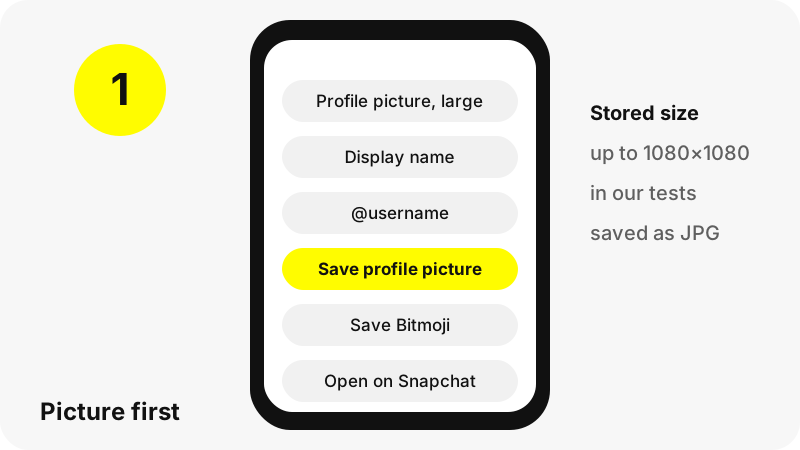
Why does the picture look bigger here than on Snapchat?
Because Snapchat's public page shows a reduced copy. The image address on the page asks Snapchat's servers for a version resized to 90 pixels. The original stored image is much larger; the page simply never displays it.
SnapViewer requests the image without that resize step, so the server returns the stored file. Nothing is enlarged or sharpened on our side. If the owner uploaded a small photo, you get a small photo; if they uploaded a large one, you get the large one.
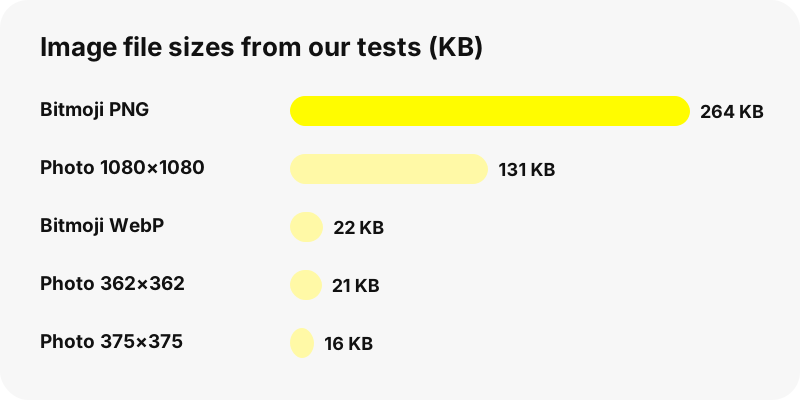
What sizes did the viewer return in our tests?
We checked four well-known public profiles on 2026-10-30. The stored size depends entirely on what each owner uploaded.
| Profile | Stored size | File size | Snapchat page shows |
|---|---|---|---|
| Large public account A | 1080×1080 JPG | about 125–131 KB | 90×90 |
| Large public account B | 1080×1080 JPG | about 125–131 KB | 90×90 |
| Public account C | 375×375 JPG | 16 KB | 90×90 |
| Public account D | 362×362 JPG | 21 KB | 90×90 |
| Personal account (Bitmoji) | 1050×1400 PNG or WebP | 264 KB PNG · 22 KB WebP | Bitmoji |
So the realistic ceiling is 1080×1080. Any site that advertises HD or 4K profile pictures for Snapchat is promising pixels that do not exist.
Whose profile picture can you see?
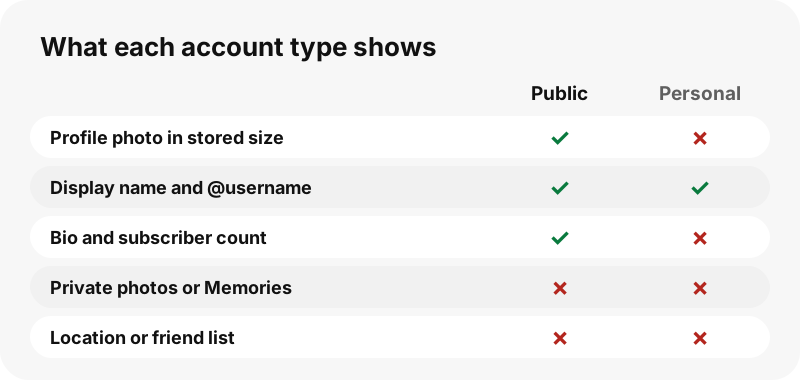
Only the photo on a Public Profile. Snapchat itself treats that photo as visible beyond friends, as its help page about public profile pictures notes:
“In addition to your Public Profile, your profile picture can be seen by people you’re not friends with in Add Friends, the Add a Friend section in Search, and the Suggested For You section on Profiles.”
Personal accounts do not have a public photo on the web page, so the viewer cannot show one. It never reaches into private photos, Memories, chats or anything shared with friends only.
Can you download a Bitmoji with this tool?
Yes, when Snapchat includes it. For many personal accounts the public page carries the owner's 3D Bitmoji instead of a photo. The card then shows a Save Bitmoji button, which saves a PNG when Snapchat offers one and a WebP otherwise.
In our test the PNG was 1050×1400 pixels with a transparent background, handy for stickers or a clean cut-out. Snap describes a Bitmoji as your own personal emoji, and since the standalone Bitmoji app was retired in 2026 the avatars live inside Snapchat.
Which file formats do you get?
The formats Snapchat serves, unchanged. Each one suits a different kind of image, which is why the files differ.
| Image | Format | Why that format |
|---|---|---|
| Profile photo | JPG | Lossy compression made for photographs; opens everywhere |
| Bitmoji (preferred) | PNG | Lossless with full transparency, so the background is see-through |
| Bitmoji (fallback) | WebP | Much smaller files; current browsers and phones open it |
Need every format on one page? Snapchat download formats also covers Story, Spotlight and Highlight files.
How do you do a Snapchat DP download on phone or computer?
The same way everywhere: press Save profile picture and the browser stores the JPG in its download folder. On iPhone that is Files, Downloads; on Android, the Downloads folder; on a computer, the usual Downloads directory.
Step-by-step pages: save Snapchat profile pictures on iPhone, on Android, on PC and on Mac. For Bitmoji there are matching guides, such as saving a Bitmoji on iPhone.
How does the viewer get the full-size picture?
Four steps, all on public pages. Your browser sends the username to our server, the server opens the public profile on snapchat.com without logging in, it removes the resize instruction from the picture address, and your browser displays the stored file.
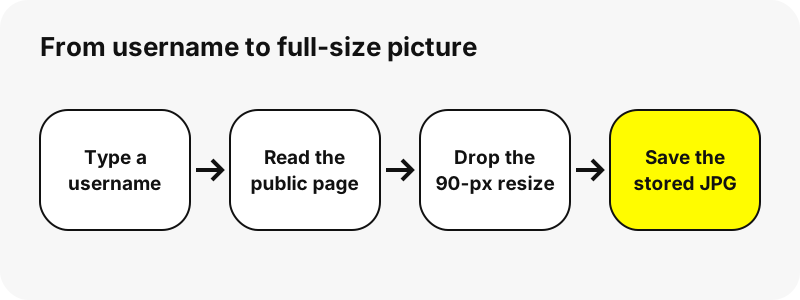
The save button uses a signed link that streams the file from Snapchat and expires after one hour. We keep no copy. Repeated lookups of the same username within five minutes reuse one cached answer.
What is the saved file called?
A readable name, so you can find it later. The profile photo saves as username_profile_picture.jpg, and a Bitmoji as username_bitmoji.png or username_bitmoji.webp.
Snaps saved from the tabs below follow the same pattern, for example username_story_20261030-142500_1.mp4, with the date and time of the snap. The Snapchat story downloader explains those names in detail.
Why is no profile picture shown?
There are a few ordinary reasons, and none of them can be worked around:
- The owner never uploaded a photo to their Public Profile, or deleted it.
- It is a personal account without a Bitmoji on its public page.
- The username is misspelled or was changed; try the Snapchat username search to check it.
- Snapchat did not answer in time. Wait a minute and try again.
If the card loads but the photo is small, that is the stored size: the owner uploaded a small image, and we never upscale it.
Will the owner know you viewed their picture?
SnapViewer never signs in to Snapchat and does not use any account of yours, so nothing ties the lookup to a Snapchat profile. Our server reads the public page as a logged-out visitor.
The picture itself loads from Snapchat's media servers, which receive an ordinary web request, and we cannot speak for what Snapchat logs there. More on this in the guide to viewing Snapchat without an account.
What can the profile picture viewer not do?
It cannot show a photo from a private account, recover an old picture the owner replaced, or reveal anything else private: friend lists, location, Snap Map, chats or Memories. It also offers no editing, cropping or AI enlargement.
For the rest of a public account, use the Snapchat profile viewer or the highlights viewer. Pages that promise private profile pictures are a warning sign; see are Snapchat viewer sites safe.
How should you use a saved profile picture?
A profile photo is often a real face, so treat it carefully. Saving it for your own reference is one thing; reposting it, using it as your own avatar or building a fake account with it is not acceptable, and may break the law where you live.
Account owners who do not want their profile on SnapViewer can opt out on the opt-out and DMCA page, and the tool will then refuse their username.
SnapViewer is an independent tool. It is not affiliated with, endorsed by, or connected to Snap Inc.
Frequently asked questions
Is the profile picture viewer free?
Yes. No account, no payment and nothing to install.
What size is a Snapchat profile picture?
It depends on the upload. In our tests the stored files were 1080×1080 for two accounts and 375×375 and 362×362 for two others, while Snapchat's page shows a 90-pixel copy.
Can I get the picture in HD or 4K?
No. You get the stored size, which topped out at 1080×1080 in our tests. We do not upscale, and no honest tool can add detail that is not there.
Can I see the profile picture of a private account?
No. Personal accounts have no public photo on the web page. At most Snapchat shows their Bitmoji, which the tool can save.
How do I save a Snapchat DP on iPhone?
Press Save profile picture in Safari, then find the JPG in Files, Downloads. The iPhone guide has screenshots of each step.
Can I download someone's Bitmoji?
Yes, when Snapchat includes it on the public page. The tool saves a PNG with a transparent background, or a WebP when no PNG is offered.
Why is the saved file a WebP and not a PNG?
Snapchat did not offer a PNG for that Bitmoji. WebP opens in current browsers and phones; any image editor can convert it.
Can I see old profile pictures?
No. Snapchat's page carries only the current photo, so that is the only one the viewer can show.
Does the picture lose quality when saved?
No. The file is saved exactly as Snapchat stores it, without recompression on our side.
Can I open the picture without saving it?
Yes. Tap the picture on the card to open the full-size file in a new browser tab.
How long does the save link work?
One hour. After that, search the username again for a fresh link.
Does the owner get a notification?
SnapViewer never logs in and sends nothing to the owner. We cannot speak for what Snapchat records on its own servers.
Is SnapViewer part of Snapchat?
No. SnapViewer is an independent tool, not affiliated with or endorsed by Snap Inc. It only reads profiles that are already public.
How can I remove my picture from SnapViewer?
Send your username through the opt-out page. After that, the tool refuses to load your profile and picture.
Guides
Story viewer — Type a username to watch a public profile's Stories, Spotlight and Highlights.
Sources
- How do I add or update the profile picture on my Public Profile? — Snapchat Support
- What is a Public Profile on Snapchat? — Snapchat Support
- What is a Bitmoji? — Snapchat Support
- What is a 3D Bitmoji? — Snapchat Support
- Image file type and format guide — MDN
- Bitmoji — Wikipedia
- What is Find Friends? (private friend lists) — Snapchat Support