What are Snapchat planets?
They are the eight planets of the Friend Solar System, a feature that comes with a Snapchat+ subscription. Each planet stands for one position on a friend's Best Friends list. If you are that friend's closest contact, you appear as Mercury. If you are the eighth, you appear as Neptune.
The feature does not rank your own friends for you. It answers a narrower question: where do you sit in their list? You only see that answer from inside the app, on the Friendship Profile of a person who already has you among their eight Best Friends.
Snap describes the badge and the planet in its help center. The wording matters, because it explains that the planet reflects a position on a list, not a score or a feeling.
“Tapping on the badge will show you which planet you are in their Solar System, with each planet representing a different position in their Best Friends list.”
So the short version is simple: the planets are a position marker on someone else's Best Friends list, drawn as a solar system, and visible only to paying Snapchat+ members who switch the feature on.
What is the Snapchat planet order?
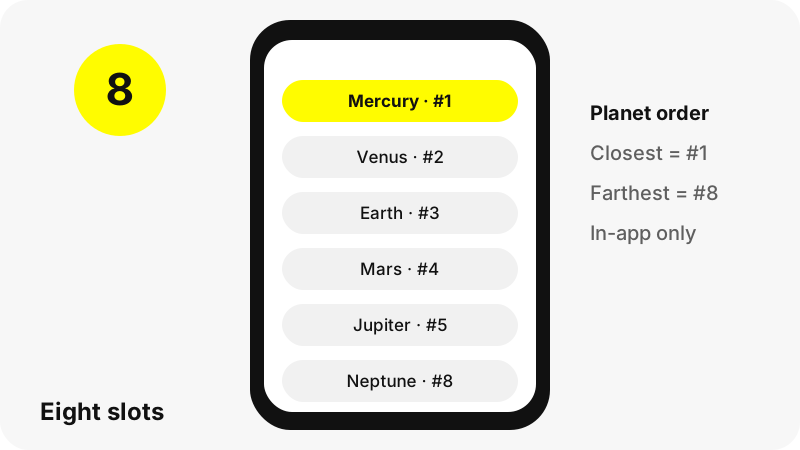
The Snapchat planet order follows the real solar system, counted outward from the Sun. Snap's help page lists the planets from Mercury to Neptune, and the planets in our own solar system sit in that same order of increasing distance. The closer the planet is to the Sun, the higher your place on the friend's list.
| Planet | Position on their Best Friends list | Plain reading |
|---|---|---|
| Mercury | #1 | You are the friend they Snap and Chat with the most |
| Venus | #2 | Second most frequent contact |
| Earth | #3 | Third place |
| Mars | #4 | Fourth place |
| Jupiter | #5 | Fifth place |
| Saturn | #6 | Sixth place |
| Uranus | #7 | Seventh place |
| Neptune | #8 | Still one of their eight Best Friends, in the last slot |
Pluto is not part of it. Astronomers count eight planets, and Snapchat has eight Best Friend slots, so the two lists line up one to one. If you are outside someone's top eight, there is simply no planet to show.
Because Best Friends are recalculated often, your planet can change from week to week. Moving from Earth to Mars only means another friend exchanged a few more Snaps or Chats with that person recently.
How does Snapchat decide who is a Best Friend?
Snapchat bases Best Friends on activity. Snap says Best Friends are the friends you Snap and Chat with the most, that you can have up to eight of them, and that the list is updated regularly. Nothing in the help pages mentions likes, follows or time spent looking at a profile.
That is why the planets move. A long weekend of Chats with a cousin can lift them above a close friend you only Snap on weekdays. The planets mirror that shift without judging it.
One detail surprises people: Snap notes that My AI can land on the list too. If you message the chatbot as often as your other Best Friends, it may take one of the eight places, which pushes everyone below it down by one planet.
The same activity data powers the Friend Emojis next to names in the Chat list. Those emojis are free for everyone, while the planet view is the Snapchat+ way of showing the same ranking.
How do you turn on Snapchat planets?
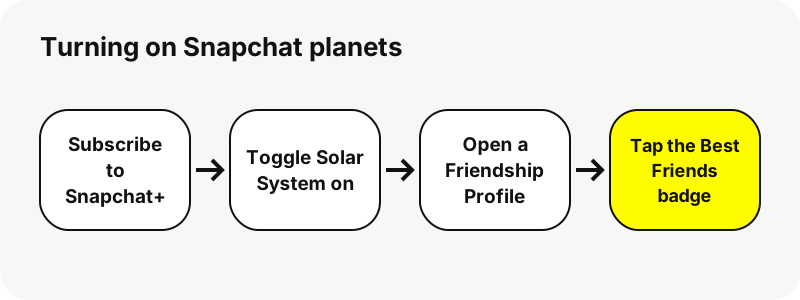
You turn them on from the Snapchat+ settings. Snap says Solar System is off by default for first-time subscribers and has to be switched on from the Snapchat+ feature management page. It can be switched off again at any time.
- Subscribe to Snapchat+ inside the app (the price shown on your device is the one you pay).
- Open your profile and tap the Snapchat+ membership card to reach the feature list.
- Find Solar System and toggle it on.
- Open the Friendship Profile of a friend and look for the Best Friends badge with a gold ring.
- Tap the badge to see the planet that marks your place in their list.
If you see no badge on a friend's profile, you are not one of their eight Best Friends at the moment. That is the whole explanation; it is not an error you can fix in settings.
Who can see your Snapchat planets?
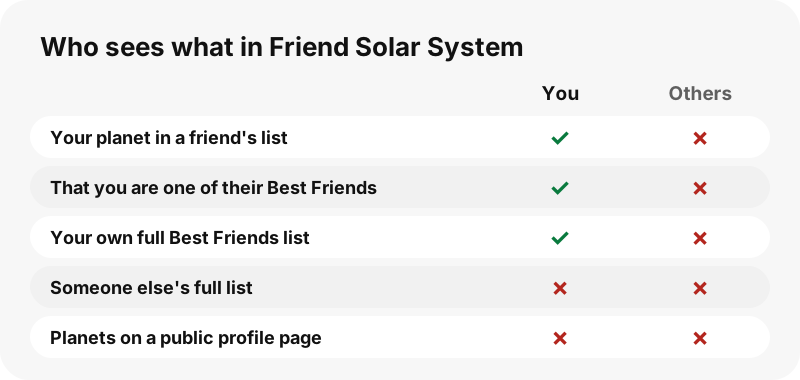
Only the people involved, and only inside the app. Snap is clear that your full Best Friends list stays private. A friend can learn that they are on it, and with Snapchat+ which position they hold, but nobody can open your list and read all eight names.
“People may see if they’re among your Best Friends, but no one else can see your Best Friends list.”
In practice that means a Snapchat+ subscriber who has the feature on sees one planet per friend: their own position in that friend's list. Your other seven Best Friends stay hidden from them, and from everyone else.
Do you need Snapchat+ to see the planets?
Yes. Snap files Friend Solar System under Snapchat+ features, and its help page describes the badge as something you see as a Snapchat+ subscriber. Free accounts keep the Friend Emojis but do not get the planet view.
Snapchat+ includes a long list of other extras, from custom app icons to Story Rewatch counts. Snap's overview page names Solar System in that list, next to the Extended Best Friends List, Streak Restore and the Snapscore Multiplier.
| Friendship feature | Free account | Snapchat+ |
|---|---|---|
| Best Friends on the Send To screen | Yes | Yes |
| Friend Emojis (hearts, smiley, fire) | Yes | Yes |
| Solar System planets on a Friendship Profile | No | Yes, after switching it on |
| Extended Best Friends List (next 8) | No | Yes |
| Pin a #1 Best Friend | No | Yes |
Pricing differs between countries and devices, and Snap says the price shown in your own app is the one you are charged. We do not list a price here because it changes.
What do the hearts and emojis next to the planets mean?
They are a separate system. The planet shows your place on a friend's list, while Friend Emojis describe the relationship from both sides. Many people confuse the two, so here is how the emojis work according to Snap's emoji guide.
- Yellow heart (Besties): you are each other's #1 Best Friend.
- Red heart (BFF): you have been each other's #1 Best Friend for two weeks in a row.
- Pink hearts (Super BFF): the same, for two months in a row.
- Smiley face (BFs): they are one of your Best Friends, but not your #1.
- Grimacing face (Mutual Besties): your #1 Best Friend is also their #1.
- Sunglasses (Mutual BFs): you share a Best Friend with them.
- Fire with a number: you are on a Snapchat Streak together.
A practical tip: if you are Mercury on a friend's planet view and they carry a yellow heart in your Chat list, you are each other's top contact. If you are Mercury but see no heart, the closeness only runs one way.
Why did my planet change on Snapchat?
Because the list behind it changed. Best Friends are updated regularly, so a planet is a snapshot of recent activity, not a permanent rank. Three common causes explain almost every move.
- Someone else Snapped or Chatted with your friend more than you did in recent days.
- You talked less: a holiday, exams or a busy week is enough to slide one or two planets.
- My AI or a new contact entered their top eight and pushed the lower slots down.
Snap also says its support team cannot add, restore or replace Best Friend Emojis. The same logic applies to the planets: there is no request form to move up, because the ranking comes straight from activity.
If the badge disappears completely, either you dropped out of their eight Best Friends, or one of you turned the Snapchat+ feature off or ended the subscription.
What is the Extended Best Friends List?
It is a second Snapchat+ feature that sits next to the planets. Instead of showing where you are on someone else's list, it shows your own: your current eight Best Friends, the next eight Upcoming Best Friends, and any movement up or down since you last looked.
Think of it as the mirror image of the Solar System. The planets tell you how a friend's activity places you; the extended list tells you how your activity places them. Neither one is ever shown to third parties.
Snap also lets subscribers pin one friend as their #1 Best Friend. Only you see who you pinned, and if both of you pin each other, you both get a special Best Friend emoji.
Can a website show someone's Snapchat planets?
No. The planets live inside the app, behind a login and a subscription, and only on Friendship Profiles between two people who are friends. Snapchat does not publish Best Friends lists on public profile pages, so no website can read them.
That includes SnapViewer. Our Snapchat profile viewer reads only what a public profile shows to everyone: the display name, username, subscriber count, bio, picture, public Story, Highlights and Spotlight. Best Friends, planets, Friend Emojis, Snapscore and friend lists are never part of that page.
Any site that offers to reveal a person's Best Friends or planet ranking is either guessing or trying to collect your login. Our guide on whether Snapchat viewer sites are safe lists the warning signs.
Are Snapchat planets a measure of friendship?
Not really. The ranking counts Snaps and Chats, so it rewards frequent, light contact. A best friend you call every evening or see at school may never reach Mercury if you rarely Snap each other.
Group chats, family members and work contacts can also crowd the top eight. Seeing Neptune, or no planet at all, says nothing about how much someone values you; it only says how often the app counted an exchange recently.
If the planets cause stress, the fix is easy: switch Solar System off in the Snapchat+ settings. It can be turned on again later, and switching it off does not change anyone's Best Friends list.
How do Snapchat planets compare with Score and Streaks?
All three come from activity, but they answer different questions. The planets show a position on one friend's list. A Streak counts consecutive days of Snaps between two people. The Snapscore is a single number for a whole account.
- Snapchat Score: one running total per account, based on Snaps sent and received, Stories posted and a few other factors.
- Snapchat Streaks: a fire emoji and a day count while two friends keep Snapping daily.
- Snapchat planets: your place, from Mercury to Neptune, in a friend's eight Best Friends.
Only one public number appears on a public Snapchat profile: the subscriber count, when the owner shows it. If you want to read that number, or watch a public Story, our Snapchat story viewer does it from any browser.
What can SnapViewer show about a public profile?
SnapViewer is an independent web tool for public Snapchat profiles. You type a username and see the profile card, the current public Story, saved Highlights and Spotlight videos, each with a Download button for the file Snapchat serves.
It never shows planets, Best Friends, Snapscore, friend lists, chats, Memories or location, and it cannot open private accounts. Start with the Snapchat username search if you only know part of a name, or open the Highlights viewer to browse saved Stories.
SnapViewer is not affiliated with, endorsed by, or connected to Snap Inc. Profile owners can ask us to stop showing their public profile; see the copyright and opt-out page.
Frequently asked questions
What do Snapchat planets mean?
Each planet marks your position on a friend's Best Friends list. Mercury means you are their #1 Best Friend, Venus #2, and so on out to Neptune at #8.
What is the Snapchat planet order?
Mercury, Venus, Earth, Mars, Jupiter, Saturn, Uranus and Neptune: the same order as the planets' distance from the Sun. Mercury is the closest position, Neptune the eighth.
Is Pluto part of the Friend Solar System?
No. There are eight Best Friend slots and eight planets, from Mercury to Neptune. Pluto is not used.
Do I need Snapchat+ for Snapchat planets?
Yes. Friend Solar System is a Snapchat+ feature. Free accounts still get Best Friends and Friend Emojis, but not the planet view.
Why can't I see a planet on my friend's profile?
Either you are not among their eight Best Friends right now, or Solar System is off. Snap says it is off by default for first-time subscribers and must be switched on in the Snapchat+ settings.
Can my friends see my whole Best Friends list?
No. Snap says people may see whether they are among your Best Friends, but nobody else can see the full list.
Does Mercury mean they are my best friend too?
Not necessarily. Mercury means you are their #1. Whether they are your #1 depends on your own activity; a yellow heart in your Chat list shows that it is mutual.
How often does my planet change?
Best Friends are updated regularly, so your planet can shift whenever the amount of Snaps and Chats between people changes.
Can My AI take a planet spot?
It can appear on a Best Friends list if someone chats with it as much as with their other Best Friends, which pushes the lower spots down.
Can I turn the Solar System off?
Yes. Solar System can be toggled on or off at any time from the Snapchat+ feature settings.
Can a website show someone's Snapchat planets?
No. Planets and Best Friends lists are only inside the app. Public profile pages do not include them, so no viewer site can show them, SnapViewer included.
Is SnapViewer part of Snapchat?
No. SnapViewer is an independent tool, not affiliated with Snap Inc. It only reads what public profiles show to everyone.
Guides
Story viewer — Type a username to watch a public profile's Stories, Spotlight and Highlights.
Sources
- How do Friend Solar Systems work? — Snapchat Support
- How do Best Friends work on Snapchat? — Snapchat Support
- What is the Extended Best Friends List option in Snapchat+? — Snapchat Support
- How does Best Friends Forever work on Snapchat? — Snapchat Support
- What do my Friend Emojis mean on Snapchat? — Snapchat Support
- What is Snapchat+? — Snapchat Support
- Solar System — Wikipedia
- Snapchat — Wikipedia