Are Snapchat viewer sites safe?
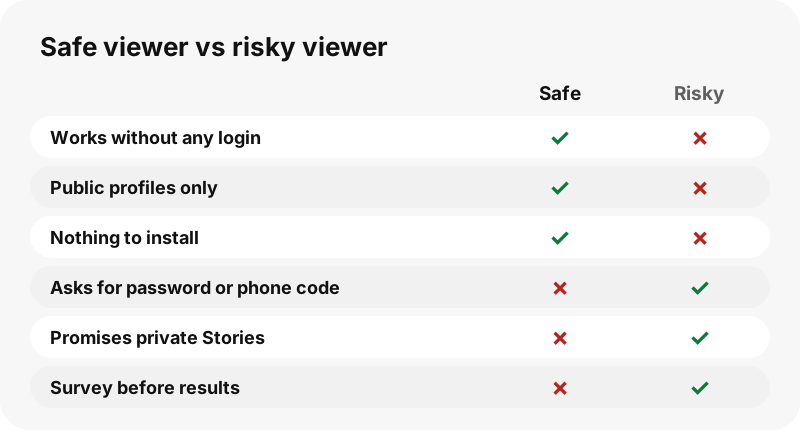
Some are, many are not. A viewer that only reads public profiles, never asks for your login and installs nothing is about as risky as any normal website. The dangerous ones ask for your Snapchat password, push an app or file, or promise to unlock private accounts, which no honest site can do.
The quick test fits in one sentence: if a site wants something from you (a password, a phone code, an install, a survey or a payment) to show you something that should be public, close it.
What are the red flags of an unsafe viewer?
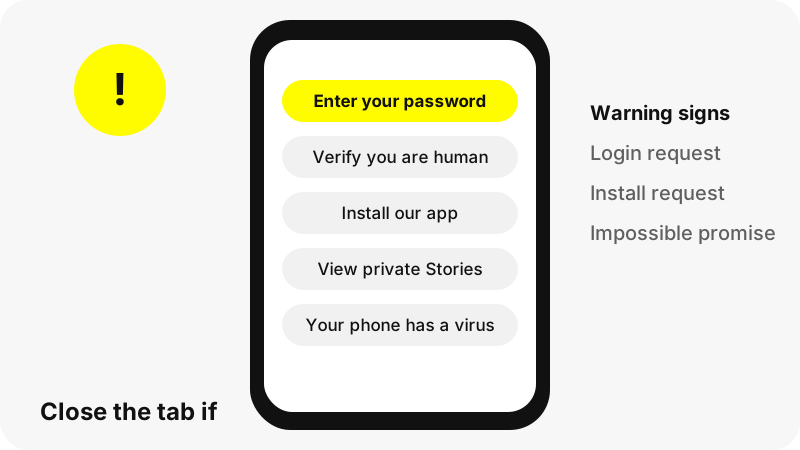
Most bad viewers give themselves away within a few seconds. Watch for these signs before you type anything.
| Red flag | Why it is dangerous |
|---|---|
| Asks for your Snapchat username and password | Classic account theft; Snap never needs a third party to have it |
| Asks for a code sent to your phone | That code is your second login factor |
| Promises private Stories, chats or Memories | Impossible for any outside site; the promise is bait |
| Promises Snap Map location or a friend list | Also impossible, and a stalking tool if it were real |
| "Human verification", surveys or offers first | Earns the site money and leads nowhere |
| Wants you to install an app, APK or extension | Software can do far more harm than a web page |
| Says your phone has a virus | A scare tactic to push a download |
| Claims HD or 4K versions of Snaps | Snapchat does not serve them; the label is false |
A single red flag is enough to leave. Two or more together, such as a private-account promise followed by a survey, is the pattern of a scam page, not a tool.
Why should you never enter your Snapchat password?
Because a viewer for public content has no use for it. Public profiles open in any browser without logging in, so a site asking for your login is collecting it, not using it. Snap is clear that even its own staff will not ask:
“A Snapchat representative will never ask you for your password.”
The same goes for one-time codes. Snap's two-factor authentication sends an extra code for each login; anyone who gets your password and that code can sign in as you.
Are Snapchat viewer apps and plugins safe?
Snap treats unofficial apps and plugins as a risk to your account. Its help centre names several, including modified versions sold as Snapchat++ or "Snapchat Plus", and warns that using them can get an account locked.
“It is against our Terms of Service to use any unauthorized third-party apps or plugins with Snapchat.”
Snap explains that these apps use your Snapchat username and password instead of a secure connection. A web page that reads public profiles without any login is a different thing: it never touches your account, so there is nothing to lock.
Can a viewer site really show private accounts?
No. Private Stories, friends-only Stories, chats and Memories are delivered only to the people the owner allowed, inside the app. A website outside Snapchat never receives them, so it cannot pass them on.
Sites that claim otherwise tend to ask for something first: a survey, a payment, a login or an app install. Some simply show public content and label it "private". Either way, the claim alone tells you the site is willing to mislead you.
Our guide why a Snapchat profile shows nothing explains what a personal account really shows to outsiders: a name and a Bitmoji, nothing more.
How do you spot phishing on viewer sites?
Phishing pages copy the look of a trusted brand to get you to type a password. The US Cybersecurity and Infrastructure Security Agency (CISA) lists common signs, and they apply to viewer sites as much as to emails.
- Urgent or emotional language that pushes you to act now.
- Requests for personal or financial information.
- Untrusted shortened links.
- Addresses or links with small misspellings of a real brand.
Treat a page that copies Snapchat's design or calls itself "official" with extra suspicion. An honest third-party tool says plainly that it is not part of Snapchat.
Does your browser protect you?
Partly. Chrome, for example, checks sites against Google Safe Browsing and shows a red "Dangerous site" warning for known phishing and malware pages; other major browsers have their own protection settings. Google's Chrome Help also warns that some sites claim you have a virus to push a harmful download.
Snapchat itself checks links opened inside the app with Google Safe Browsing. Both systems catch known bad sites, not every new one, and Snap notes that the service is not perfect. A clean result is a good sign, not a guarantee, so the red flags above still matter.
What does a safe viewer do with your data?
As little as possible, and it says so in its privacy policy. Here is how SnapViewer handles each piece, taken from our privacy policy, which is written from the site's code.
| Data | What SnapViewer does |
|---|---|
| The username you type | Sent to our server to read the public page, then discarded; not logged |
| Your Snapchat login | Never asked for, never possible to give |
| Cookies and third-party trackers | None set; no third-party analytics or ads at launch |
| Your IP address | Kept in a first-party visit log, deleted after 90 days |
| Files you save | Streamed from Snapchat's servers; no copy kept |
| Download links | Signed, valid for one hour, limited to Snapchat media hosts |
One honest caveat: previews play straight from Snapchat's media servers, which see your IP address as with any public image online. We cannot control what Snapchat logs on its own servers.
Are the downloaded files safe?
A real Snap download is a video (MP4) or a photo (JPG): media files, not programs. Check the file name and type before opening anything. A "Snap" that arrives as .apk, .exe, .dmg, .zip or a configuration profile is not a Snap.
SnapViewer's downloads are named after the account and the Snap, for example a username followed by story, a date and a number, ending in .mp4 or .jpg. Our server only fetches files from Snapchat's own media hosts, so it cannot be used to deliver files from anywhere else.
For where files land on each device, see where Snapchat downloads go.
What should you do if you already gave a site your login?
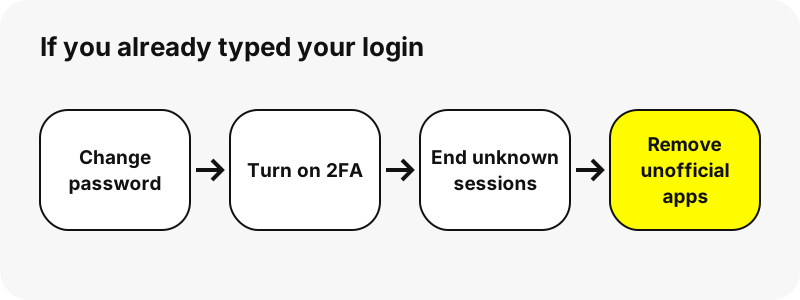
Act quickly, in this order. The steps follow Snap's own security advice.
- Change your Snapchat password to a new, unique one you use nowhere else.
- Turn on two-factor authentication in the Snapchat app.
- Open Snap's session management and sign out any device or browser you do not recognise.
- Uninstall any unofficial Snapchat app or plugin you installed.
- If you reused the old password elsewhere, change it there too.
If the account is already locked because of an unofficial app, Snap says its team cannot unlock it, which is one more reason never to install one.
How does SnapViewer measure up?
We built SnapViewer to pass every check on this page. It asks for no login, sets no cookies, installs nothing and says on every page that private accounts, locations and friend lists are out of reach. It works in the browser on any device, and the files you save are the MP4 and JPG files Snapchat serves.
Try it with any public username on the Snapchat story viewer, or open the profile viewer or video downloader. Profile owners who prefer not to appear can use our opt-out page.
SnapViewer is independent and is not affiliated with, endorsed by, or connected to Snap Inc. It reads only public profiles and never asks for a Snapchat login.
Frequently asked questions
Are Snapchat viewer sites safe to use?
The honest ones are: they need no login, install nothing and show only public profiles. Avoid any site that asks for your password or promises private content.
Can a Snapchat viewer hack my account?
Not if you never give it your login. A viewer that reads public pages never touches your account.
Is it safe to log in to a viewer with my Snapchat account?
No. A public viewer has no need for your login, and Snap says unofficial third-party apps can get accounts locked.
Do private Snapchat viewers work?
No. Private and friends-only content never leaves Snapchat's app for outsiders. Sites that promise it are misleading you.
Why do some viewer sites ask me to complete a survey?
Surveys and offers earn the site money. They never unlock content, so close the page.
Is a Snapchat viewer APK safe?
Treat it as unsafe. Installed software can do much more than a web page, and Snap warns against unofficial apps.
Can the account owner see that I used a viewer?
SnapViewer never logs in, so no account of yours is attached. We cannot speak for what Snapchat's media servers record.
Does SnapViewer store my searches?
No. The username you type is used to read the public page and then discarded. Results may be cached for five minutes, keyed by username, not by you.
Does SnapViewer use cookies or ads?
No cookies, no third-party analytics and no ads at launch, according to our privacy policy.
What files should a Snapchat download be?
MP4 for videos and JPG for photos. Anything else, such as .apk or .exe, is not a Snap.
Is SnapViewer part of Snapchat?
No. SnapViewer is an independent tool and is not affiliated with Snap Inc. It only reads public profiles.
Can I report an unsafe viewer site?
Yes. CISA advises reporting suspected phishing instead of engaging with it, and Chrome users can turn on Safe Browsing warnings for known bad sites.
Guides
Story viewer — Type a username to watch a public profile's Stories, Spotlight and Highlights.
Sources
- Can I use third-party apps or plugins with Snapchat? — Snapchat Support
- What steps can I take to help protect my security and safety on Snapchat? — Snapchat Support
- How Snapchat Uses Google Safe Browsing — Snapchat Support
- Recognize and Report Phishing — CISA
- Manage warnings about unsafe sites — Google Chrome Help
- How do Private Stories on Snapchat work? — Snapchat Support
- Phishing — Wikipedia