Where do Snapchat downloads go on each device?
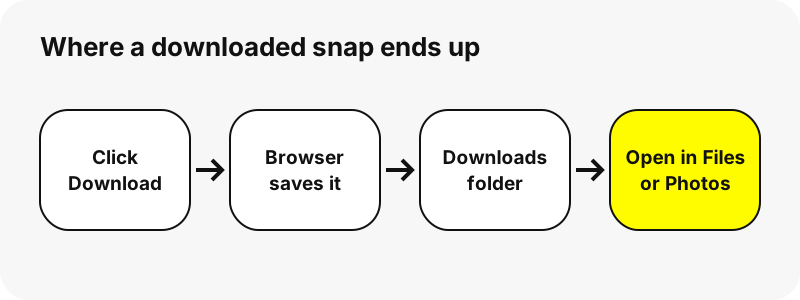
Every browser drops a downloaded file into one default folder, and each operating system has one app to find it. The table sums it up; the sections below explain each device and how to change the folder.
| Device | Default folder | Open it with | Plays the MP4 in |
|---|---|---|---|
| iPhone | Downloads (iCloud Drive or On My iPhone) | Files › Browse › Downloads | Files, or Photos after Save Video |
| iPad | Downloads (iCloud Drive or On My iPad) | Files › Browse › Downloads | Files, or Photos |
| Android (Pixel and most phones) | Download, internal storage | Files by Google, Chrome › Downloads | Google Photos (device folders) |
| Samsung Galaxy | Download, internal storage | My Files › Downloads | Google Photos or the file in My Files |
| Windows PC | C:\Users\[your name]\Downloads | File Explorer, browser download list | Photos app |
| Mac | Downloads in your user folder | Finder, Safari downloads list | QuickTime Player |
| Chromebook | Downloads (temporary) | Files app | Files app |
Is a website download different from saving in the Snapchat app?
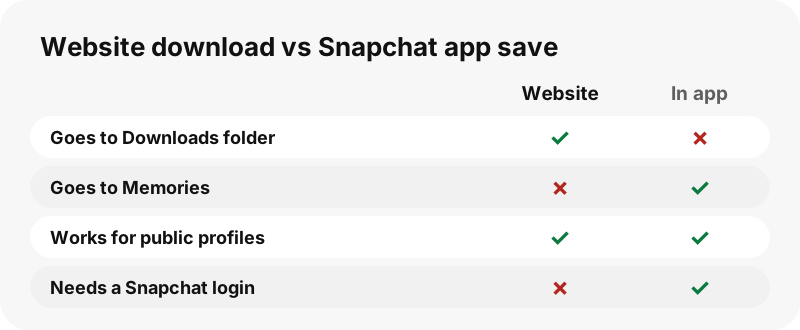
Yes, and it is the most common source of confusion. When you save one of your own Snaps inside the Snapchat app, it goes to Memories, to your phone's Camera Roll, or to both. Snap's help page describes the setting that decides this.
“You can change how your Snaps are saved to Memories and your device’s Camera Roll.”
In the app, the path is Settings › My App › Memories › Save Button, with the options Memories, Memories & Camera Roll, or Camera Roll. A file downloaded through a website such as SnapViewer never touches Memories. It is an ordinary MP4 or JPG handled by your browser, so it follows the browser's download rules described below.
Where do downloaded snaps go on iPhone?
Into the Downloads folder of the Files app. Apple says that files downloaded from the internet appear there, and that you may need to tap iCloud Drive on the Browse screen first. In Safari, the Downloads button next to the search field lists recent files.
Safari lets you choose the location under Settings › Apps › Safari › Downloads: iCloud Drive, On My iPhone, or Other. Videos do not appear in Photos on their own; open the MP4 in Files and use the Share button to save it there. The full walkthrough is in how to download Snapchat videos on iPhone.
Where do they go on iPad?
The same place as on iPhone: Files › Browse › Downloads, in iCloud Drive or on the iPad itself depending on your Safari setting. If you use iCloud Drive for downloads, a clip saved on the iPhone shows up in the same folder on the iPad. Steps specific to the tablet are on downloading Snapchat videos on iPad.
Where do saved videos go on Android?
Chrome saves files to your default download location, which on almost every phone is the Download folder of internal storage. Google's Chrome help says to open the Files app to see everything you downloaded, or you can use More › Downloads inside Chrome.
Files by Google lists recently downloaded items under Recents. Google Photos keeps the camera in front, so open its device folders view and pick Download to see saved videos; backup applies only to the device folders you switch on. More detail is in how to download Snapchat videos on Android.
Where do downloads go on a Samsung Galaxy?
Into the same Download folder, which Samsung shows through its own file manager.
“If you're wondering where your downloaded files are stored on your Samsung phone, they are typically saved in the My Files app by default.”
Open My Files, tap Downloads, or use the search bar at the top. Samsung lists three reasons a file seems missing: some apps save straight into Images or Videos folders, the file went to an SD card, or it was deleted and may still sit in the Recycle Bin.
Where do the files go on a Windows PC?
Into the Downloads folder of your Windows account. Microsoft gives the usual path as C:\Users\[your name]\Downloads and says the exact location is shown in your browser's settings. In Edge you change it under Settings › Downloads › Location, and you can turn on a prompt that asks where to save each file.
Chrome shows recent files in its download tray at the top right. To play a clip, the Windows Photos app supports MP4, MOV and AVI video, Microsoft says. See how to download Snapchat videos on PC for the full steps.
Where do they go on a Mac?
Into the Downloads folder of your user account. In Safari, click the Downloads button near the top-right corner, then the magnifying glass next to a file to reveal it in Finder. Apple explains that you change the folder in Safari › Settings › General › File download location.
Two Safari habits surprise people. The downloads list clears items after one day by default, though the files stay put. And downloading the same item twice removes the older duplicate. QuickTime Player opens the MP4. Full steps: how to download Snapchat videos on Mac.
Where do downloads go on a Chromebook?
Into a Downloads folder that Google describes as temporary, which matters if you want to keep the videos.
“By default, your files are saved to your Downloads folder, a temporary folder on your Chromebook's hard drive.”
Google also warns that a Chromebook may delete downloaded files to free space. Move clips you care about to Google Drive or another folder, or change the default in Chrome's Downloads settings. Device notes are on downloading Snapchat videos on Chromebook.
What are the downloaded files called?
SnapViewer names every file so you can find it by searching your Downloads folder for the username. Search for the account name and every clip appears.
| What you saved | File name pattern | Format |
|---|---|---|
| Story snap | user_story_YYYYMMDD-HHMMSS_n | MP4 or JPG |
| Spotlight video | user_spotlight_id | MP4 |
| Highlight snap | user_highlight title_n | MP4 or JPG |
| Profile picture | user_profile_picture | JPG |
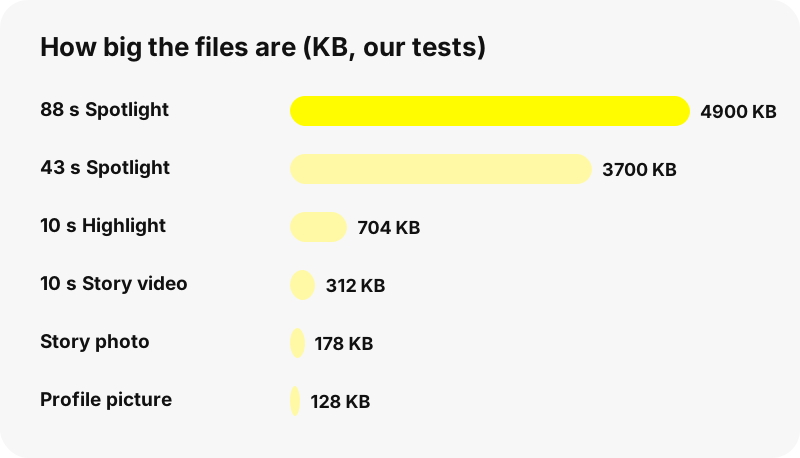
Files come one per snap. The Save all N, one by one button downloads a whole tab in sequence, still as separate files, and there is no ZIP. Sizes are small: in our tests Story clips were a few hundred KB and Spotlight videos up to 4.9 MB.
Why can't you find a file you just downloaded?
- It never finished. Check the browser's download list for a paused or failed item and try again.
- The link expired. SnapViewer download links last one hour. Look the username up again.
- Another folder was chosen. iPhone may save to iCloud Drive or On My iPhone; Edge and Chrome may ask each time.
- You looked in the gallery. Photos apps do not always show the Download folder; open the file manager instead.
- It was cleaned up. Chromebooks may delete downloads when space runs low, and Safari's list forgets items after a day.
If the problem is that a profile shows nothing to download, read why a Snapchat profile shows nothing.
Which Snapchat content can you download at all?
Only what public profiles show: the public Story, saved Highlights, Spotlight videos and the profile picture. The Snapchat video downloader, story downloader, Spotlight downloader and profile picture viewer all save files the same way, so this page applies to all of them.
Private accounts, friends-only Stories, chats and Memories are never reachable. Please respect the people behind the profiles: ask before reposting a clip. Account owners can opt out on the removal page.
Frequently asked questions
Where do Snapchat downloads go on iPhone?
Files you download in Safari go to Files › Browse › Downloads, in iCloud Drive or On My iPhone depending on your Safari setting.
Where are the files saved on Android?
To the Download folder in internal storage. Open Files by Google, My Files on Samsung, or Chrome › More › Downloads.
Where do they go on a Windows PC?
To your Downloads folder, usually C:\Users\[your name]\Downloads, unless you changed it in the browser.
Where do they go on a Mac?
To Downloads in your user folder. Safari's Downloads button shows recent files.
Why isn't my downloaded video in Photos or the Gallery?
Browsers save to the Download folder, not the photo library. On iPhone, save it to Photos from Files; on Android, open the Download device folder in Google Photos.
Where do Snaps saved in the Snapchat app go?
To Memories, the Camera Roll or both, depending on Settings › My App › Memories › Save Button in the app.
Do website downloads appear in my Snapchat Memories?
No. A file saved from a website is handled by your browser and never goes to Memories.
Can I change where downloads are saved?
Yes. Safari on iPhone and Mac, Chrome and Edge all let you pick a folder, and Chrome and Edge can ask each time.
Why did my Chromebook delete a download?
Google says the Downloads folder is temporary and files may be removed to free space. Move clips you want to keep.
How are SnapViewer files named?
With the username first, for example user_story_date_n.mp4 or user_spotlight_id.mp4, so you can search for the account name.
Can I download a ZIP of a whole profile?
No. Save all N, one by one saves each snap as its own file.
Is SnapViewer part of Snapchat?
No. SnapViewer is an independent tool and is not affiliated with Snap Inc. It only reads public profiles.
Guides
Story viewer — Type a username to watch a public profile's Stories, Spotlight and Highlights.
Sources
- Where to find downloads on your iPhone or iPad — Apple
- Customize your Safari settings on iPhone — Apple
- Download items from the web using Safari on Mac — Apple
- Download a file (Chrome for Android) — Google
- Where Are Downloaded Files on a Galaxy Phone? — Samsung
- Find where your browser is saving downloads — Microsoft
- Open, save or delete files on your Chromebook — Google
- How do I save a Snap to Memories and Camera Roll? — Snap Inc.
- Manage photos and videos with Microsoft Photos app — Microsoft