How long do Snapchat Stories last?
Twenty-four hours is the default. A Snap you add to My Story can be watched by your friends as often as they like for one day, then it disappears from the Stories page. Snap's help centre adds one exception for paying subscribers:
“Your friends can view your Story an unlimited number of times for 24 hours (this may be longer or shorter if you're a Snapchat+ subscriber).”
Each Snap has its own clock. A Story of ten Snaps posted over an afternoon does not vanish at once; each Snap drops off 24 hours after it was added, so the Story shrinks gradually.
Does every kind of Story last the same time?
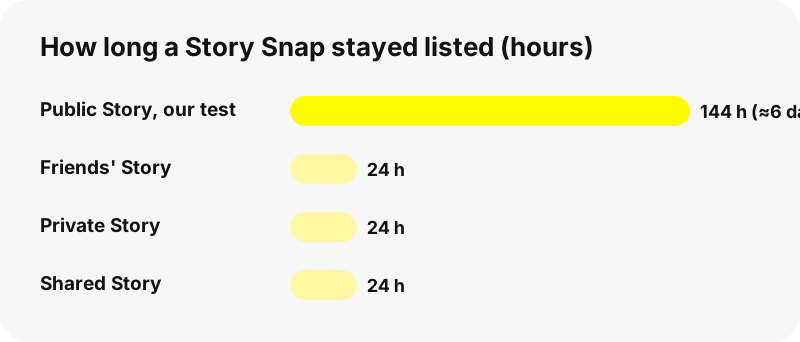
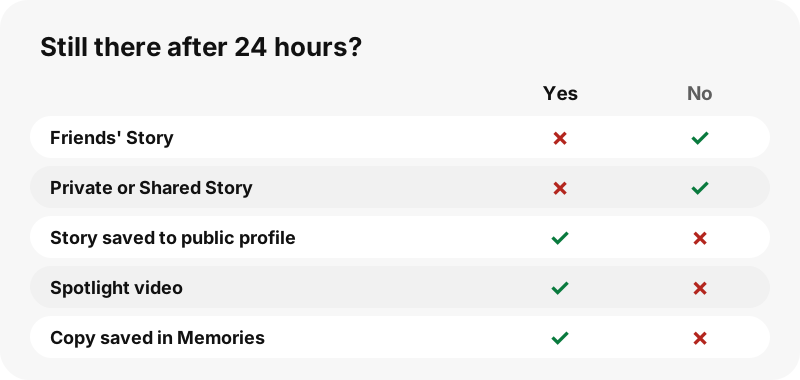
No. Friends' Stories, Private and Shared Stories expire after about a day, but anything saved to a public profile, posted to Spotlight or kept in a chat follows other rules. The table sums up what Snap's help pages say about each one.
| Where the Snap is | How long it stays | Who decides |
|---|---|---|
| My Story · Friends | 24 hours by default | Snapchat (Snapchat+ can change it) |
| Private or Shared Story | 24 hours | Snapchat; a Shared Story with no new Snap for 24 hours is deleted |
| My Story · Public | Expires like a Story unless saved | The owner, by saving it |
| Story saved to a public profile | Until the owner removes it | The owner |
| Spotlight video | Until the creator deletes it | The creator |
| Snap Map post | From a day or two to much longer | Snapchat's systems |
What happens on Snapchat's servers after 24 hours?
Snapchat deletes expired Story Snaps automatically. Snap describes the mechanism in its article on Shared Stories:
“Snapchat servers are designed to automatically delete Snaps that you add to a Story when the Snap expires (usually 24 hours after posting, but varies depending on your Settings).”
Note the words "usually" and "varies". The 24-hour figure is the normal case, not a promise about every Snap. Snap's Privacy by Product page says the same: most Stories delete after 24 hours unless you change the settings, save the Story to your public profile, or a friend saves it in Chat.
How long do public Stories last on a public profile?
An active public Story behaves like any Story and expires, but a public profile can keep Stories on display for as long as the owner wants by saving them. Saved Stories sit on the profile, where visitors see them as Highlights.
Snap also offers an auto-save setting for public profiles. When it is switched on, a new Story is added to the profile every day at midnight, built from the Public Story Snaps of the last day, and the owner gets a notification each time.
To see what a profile has kept, open it in the Snapchat highlights viewer: each saved Story appears there with its title and cover.
What did we measure ourselves?
On 2026-10-30 we looked up several large public profiles with SnapViewer. One of them listed 112 Story Snaps in its active Story, the oldest posted about six days earlier. On that account, public Story Snaps clearly outlived the 24-hour default.
We do not know which setting allowed it, so treat it as one observation on one account, not a rule. The practical lesson: if a Snap matters to you, do not count on it staying for more than a day.
| What we checked (2026-10-30) | Result |
|---|---|
| Story Snaps listed on one large public profile | 112 (76 videos, 36 photos) |
| Age of the oldest listed Snap | About six days |
| Saved Highlights on the same profile | 18 |
| Spotlight videos on the same profile | 7 |
How long do Spotlight videos last?
Much longer than Stories. Spotlight posts are not on a 24-hour timer; they stay until the creator deletes them, and Snap warns creators that they can stay visible for a long time.
“Your Spotlight submissions are stored on our servers until you delete them and may be visible on Snapchat for long periods of time.”
Our guide what is Snapchat Spotlight explains the feed, and the Snapchat Spotlight downloader lists a public profile's recent Spotlight videos.
Can a Story disappear before 24 hours?
Yes. The owner can delete any Snap from their Story at any time, one Snap after another; Snap says there is no single button for a whole Story. When a Snap is deleted, Snapchat tries to remove it from its servers and from friends' devices.
Snap adds that this may not work instantly if someone has a poor connection or an old app version, so a deleted Snap can still show for a brief moment. For a viewer like SnapViewer, a deleted Snap simply stops being listed on the next lookup.
Can you make your own Story last longer?
Yes, in a few ways that Snap supports. None of them extends the 24 hours on the Stories page for friends; they keep a copy elsewhere.
- Save your Story to Memories and your Camera Roll from My Account.
- Switch on auto-save so My Story Snaps go to Memories automatically.
- With a public profile, add the Story to the profile so it stays until you remove it.
- Post the video to Spotlight, where it stays until you delete it.
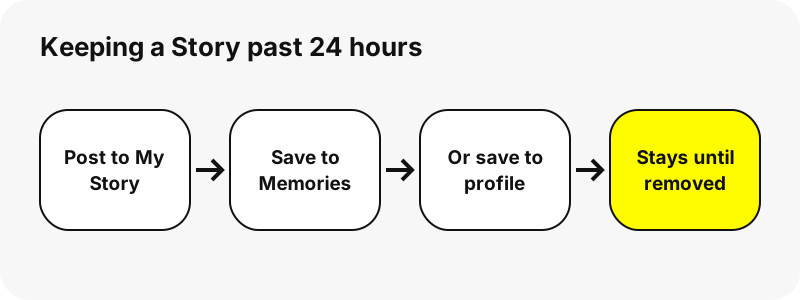
The first two keep a private copy only you can see. The last two keep the content public, which is a decision worth making on purpose. Our guide on making a public profile on Snapchat covers the trade-offs.
How long can you watch or save someone else's public Story?
Exactly as long as Snapchat keeps listing it, never longer. SnapViewer reads the public profile at the moment you press View; when a Snap expires on Snapchat, it vanishes from our results too, and we keep no archive of old Stories.
If you want a copy of a public Snap, save it while it is listed. The Snapchat story downloader gives each Snap a Download button, and the link stays valid for one hour after the lookup.
Results for a username are cached for up to five minutes, so a Snap that expired a minute ago may still appear briefly. Its file can then fail to download, because Snapchat has already removed it.
Does Snapchat show when someone watched your Story?
Your own Story's viewer list belongs to Snapchat and is shown only to you inside the app. Snapchat+ subscribers can switch on Story Timestamps, which show when each friend viewed a Story.
SnapViewer never logs in to anything, so it cannot show who viewed a Story, and it does not add a name to anyone's list. Our guide on who viewed my Snapchat Story covers what the app shows.
What is the short answer for each case?
If you need one line per case: friends' Stories last 24 hours; Private and Shared Stories 24 hours; public Stories expire too unless saved; saved public Stories and Spotlight videos stay until removed. Anything anyone screenshotted or saved can outlive all of these.
Snap's own reminder applies to every Story type: anyone who can see a Story can take a screenshot or record it. Post with that in mind.
SnapViewer is independent and is not affiliated with, endorsed by, or connected to Snap Inc. Account owners can ask us to stop showing their public profile through the opt-out page.
Frequently asked questions
When does a Snapchat Story disappear?
24 hours by default. Each Snap expires 24 hours after it was added, so a Story shrinks gradually.
Do Snapchat+ subscribers get longer Stories?
Snap says the 24-hour window may be longer or shorter for Snapchat+ subscribers.
How long do Private Stories last?
24 hours, like other friend Stories. Only the friends the owner picked can view them.
How long do Shared Stories last?
Snaps last 24 hours. If nobody adds a Snap for 24 hours, the Shared Story is deleted.
Do public Stories last longer than 24 hours?
They expire like other Stories unless saved to the public profile. In one of our tests a large public profile still listed Snaps about six days old.
How long do Highlights stay on a profile?
Until the owner removes them. Highlights are Stories saved to a public profile.
How long do Spotlight videos last?
Until the creator deletes them. Snap says they may be visible for long periods.
Can I see a Snapchat Story after 24 hours?
Only if it was saved to a public profile, posted to Spotlight, or the account kept it listed. SnapViewer has no archive of expired Stories.
Does deleting a Snap remove it right away?
Snapchat tries to remove it at once, but it can show briefly on devices with a poor connection or an old app version.
How can I keep my own Story?
Save it to Memories or your Camera Roll from My Account, or switch on auto-save to Memories.
Is SnapViewer part of Snapchat?
No. SnapViewer is an independent tool and is not affiliated with Snap Inc. It only reads public profiles.
Can SnapViewer recover deleted Stories?
No. When Snapchat deletes a Snap, it is gone from SnapViewer too. We keep no copies.
Guides
Story viewer — Type a username to watch a public profile's Stories, Spotlight and Highlights.
Sources
- How do I add Snaps to My Story? — Snapchat Support
- How do Shared Stories on Snapchat work? — Snapchat Support
- Privacy by Product: Stories — Snap Inc.
- Privacy by Product: Spotlight — Snap Inc.
- How do I auto-save Stories to my Public Profile? — Snapchat Support
- How to Delete a Snapchat Story — Snapchat Support
- How to Save My Story on Snapchat — Snapchat Support
- How do I submit a Snap to Snap Map? — Snapchat Support
- What are Story Timestamps on Snapchat+? — Snapchat Support