What do you need on a Mac?
Any Mac with Safari, Chrome or Firefox, a connection and the username of a public Snapchat profile. You do not install an app, add an extension or sign in to Snapchat. Because the work happens on our server and in Snapchat's public page, an older MacBook handles it as easily as a new one.
Only public content can be saved: the public Story, saved Highlights and Spotlight videos that snapchat.com shows to everyone. Friends-only Stories, private accounts, chats and Memories stay private. A site that claims otherwise is not telling the truth.
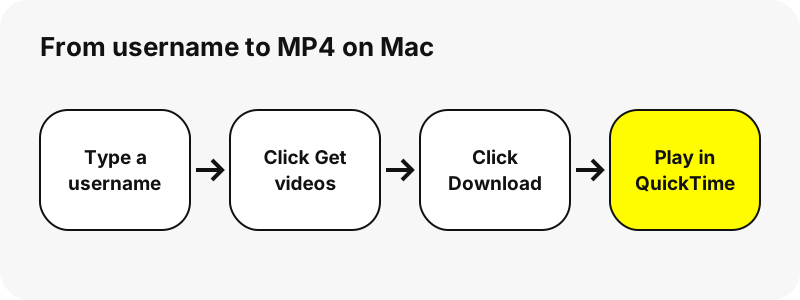
How do you download a Snapchat video on Mac, step by step?
- Open the Snapchat video downloader in Safari, or use the box at the top of this page.
- Type the username, for example
nba, or paste a snapchat.com/@name or Spotlight link with Command+V. - Click Get videos. The profile card loads with Story, Spotlight and Highlights tabs, and the Story tab puts videos before photos.
- Click a thumbnail to play the clip inside the page.
- Click Download (labelled MP4). Safari saves it to your download location.
- Click the Downloads button near the top-right corner of Safari, then the magnifying glass next to the file, to show it in Finder.
The files carry readable names, for example nba_story_20261030-142210_3.mp4 or username_spotlight_1234567890.mp4. In Finder you can sort by name to keep each account's clips together.
Where does Safari save the video?
In the Downloads folder of your user account, unless you chose another one. You can pick another folder in Safari's settings, as Apple explains.
“To change where downloaded items are saved on your Mac, choose Safari > Settings, click General, then click the “File download location” pop-up menu and choose a location.”
Apple adds a small detail worth knowing: if you move a file or change the download location afterwards, Safari's downloads list can no longer find it. The file itself is fine; open it from Finder instead.
How does it compare in Safari and Chrome?
Both browsers save the same MP4. The differences are in where you see the list and how you change the folder.
| Safari | Chrome | |
|---|---|---|
| See recent downloads | Downloads button, top right | Download tray, top right, or More › Downloads |
| Show the file in Finder | Magnifying glass next to the file | Show in Folder |
| Change the folder | Settings › General › File download location | Settings › Downloads › Location |
| Several files at once | May ask once | May ask to allow multiple downloads |
Apple also notes that, by default, Safari removes items from its downloads list after one day. Only the list entry disappears, not the file in your Downloads folder.
Which app plays the MP4 on a Mac?
QuickTime Player, which comes with macOS. Double-click the file in Finder, or open QuickTime Player and choose File › Open File, as Apple's guide describes.
Chrome users can also click the file in the download tray; Google says it then opens in the computer's default application for that file type. MP4 is broadly supported, in MDN's words, so no converter is needed before you edit or share the clip.
Which Snapchat videos can you save on a Mac?
Every video a public profile currently shows, across three tabs.
| Tab | Content | Seen in our tests |
|---|---|---|
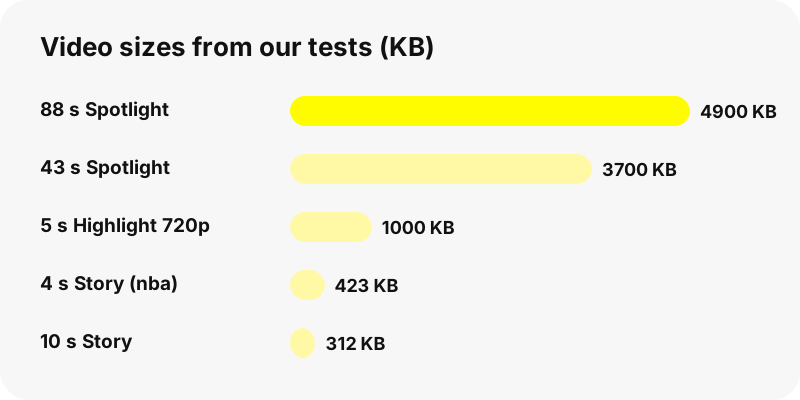
| Story | Public Story snaps with dates, up to 150 | 480×270 or 480×852 MP4 with AAC sound |
| Spotlight | Recent Spotlight videos with views and length | 540×960 MP4, 6–88 s |
| Highlights | Up to 30 Highlights, 40 snaps each | 480×852 to 720×1280 MP4 |
Each tab also has its own tool: the Snapchat story downloader, the Spotlight downloader and the Highlights viewer.
Can you download a whole profile in one go?
Click Save all N, one by one in a tab and the page downloads each video in turn, about a second apart. Safari may ask once whether snapviewer.me can download multiple files. Allow it and keep the tab open until the button says Done.
There is no ZIP. Each clip is its own MP4, which suits a Mac well: select them all in Finder and drag them into one folder to keep each account's clips together.
Why does the download fail on Mac?
- Expired link. Links work for one hour; look up the username again.
- Removed snap. If Snapchat deleted it, we cannot fetch it.
- Private or unknown account. A message appears instead of tabs.
- Paused or incomplete download. Apple advises resuming a paused download from the list, or deleting a damaged file and downloading it again.
- Duplicate file. Apple notes that Safari removes an older duplicate when you download the same item again, so do not be surprised if only one copy remains.
An empty profile is explained in why a Snapchat profile shows nothing.
What quality will the Mac copy have?
The same as on Snapchat's public page. In our tests Story clips were 480 pixels wide, Highlights up to 720×1280 and Spotlight 540×960. On a Retina display they look softer full screen than on a phone, because the source has fewer pixels.
We pass the file through untouched, with no re-encoding and no watermark. There is no 1080p or 4K version to be had, whatever some sites promise.
Can you skip the download and use screen recording?
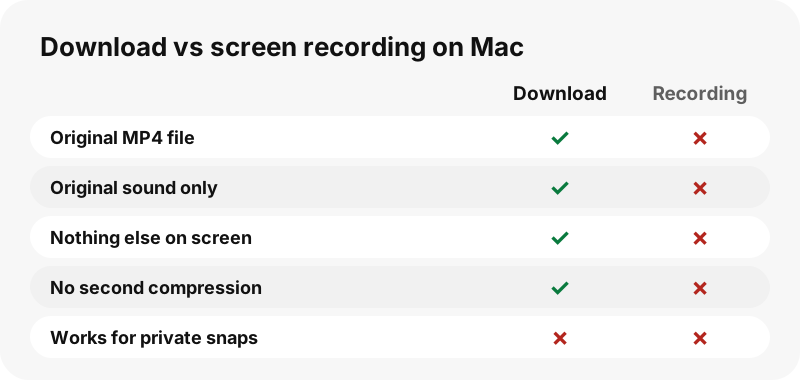
You can, but you lose quality and time. A recording captures the screen and compresses it again, and it picks up whatever else is on screen. A download gives you the original MP4 with the original sound in seconds.
Does it work on other devices too?
Yes, the site is identical everywhere. See the guides for iPhone, Windows PC and Android, or the overview of where Snapchat downloads go. With iCloud Drive as your Safari download location on iPhone, clips can even reach your Mac's iCloud Drive.
How do you download Snapchat videos respectfully?
Keep saved clips for yourself and ask the creator before reposting. Never use downloads to follow or shame a person. The guide on whether downloading Snapchat videos is legal explains more. Creators can opt out of SnapViewer on the removal page, after which their username is blocked and old links stop working.
Frequently asked questions
How do I download Snapchat videos on Mac for free?
Open SnapViewer in Safari, type a public username, click Get videos, then Download under the clip. It is free and needs no app.
Where do downloaded Snapchat videos go on a Mac?
To the Downloads folder in your home folder, unless you changed the File download location in Safari's settings.
Which app opens the video?
QuickTime Player, which comes with macOS. Double-click the MP4 or use File › Open File.
Do I need a Snapchat account?
No. SnapViewer never logs in and needs no account.
Can I download private Snapchat videos on Mac?
No. Private accounts, friends-only Stories, chats and Memories are never accessible.
Does it work in Chrome on Mac?
Yes. Chrome saves the MP4 to the same Downloads folder unless you set another location.
Can I download all videos at once?
Use Save all N, one by one. Each video downloads as its own MP4; there is no ZIP.
Why did Safari keep only one copy?
Apple notes that Safari removes an older duplicate when you download the same item again.
Why does the link say expired?
Download links last one hour. Search the username again for fresh links.
Will the video be in 4K?
No. You get Snapchat's own file, 480 to 720 pixels wide for Stories and Highlights and 540×960 for Spotlight in our tests.
Is SnapViewer part of Snapchat?
No. SnapViewer is an independent tool and is not affiliated with Snap Inc. It only reads public profiles.
Guides
Video downloader — Every video on a public profile, as MP4 files with readable names.