What do you need to save a Snapchat video on Android?
An Android phone or tablet with a browser, a connection and the username of a public Snapchat profile. Chrome is the default on most phones, but Samsung Internet, Firefox or Edge work the same way because the download is an ordinary file link.
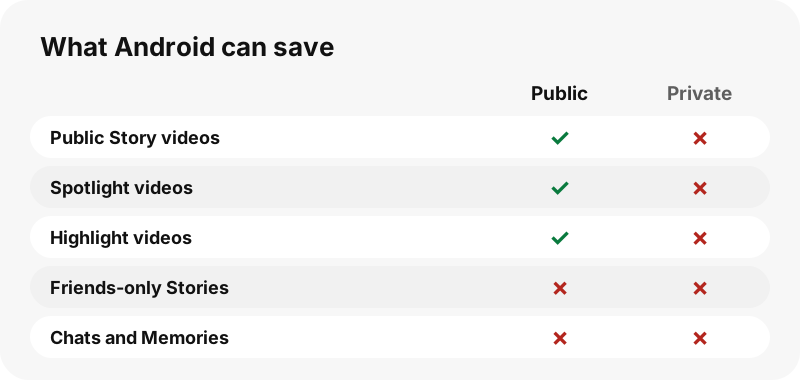
You do not need a Snapchat account, an APK, a browser extension or a screen recorder. SnapViewer reads the public profile page snapchat.com shows to anyone and gives each video its own download button. Private accounts, friends-only Stories, chats and Memories are never reachable, so no tool can honestly offer them.
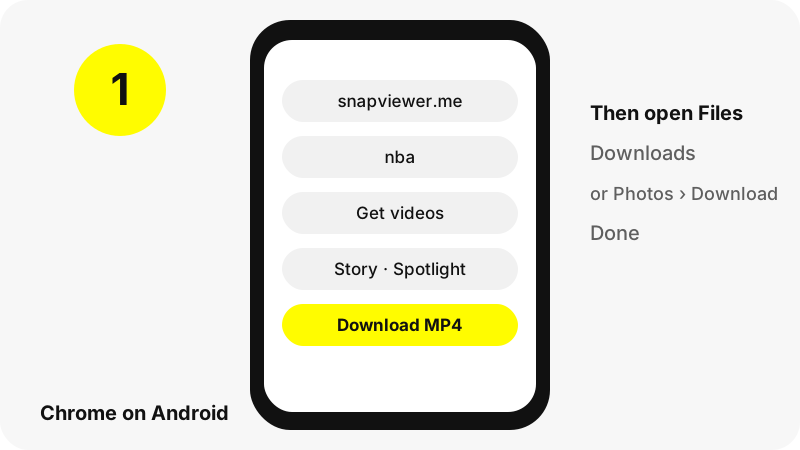
How do you download a Snapchat video on Android, step by step?
- Open Chrome and go to the Snapchat video downloader, or use the box at the top of this page.
- Type the username (for example
nba), or paste a snapchat.com/@name or Spotlight link you copied from the Snapchat app's share menu. - Tap Get videos. The profile card loads with Story, Spotlight and Highlights tabs; in the Story tab, videos are listed before photos.
- Tap a thumbnail to play the clip and make sure it is the one you want.
- Tap Download (marked MP4). Chrome saves the file in your default download location.
- Open the Files app and look in Downloads, or use Chrome › More › Downloads.
Each file gets a readable name such as nba_story_20261030-142210_3.mp4 or username_spotlight_1234567890.mp4, so you can tell Story clips and Spotlight videos apart without opening them.
Where does the video go on an Android phone?
Chrome saves it in your default download location, which on almost every phone is the Download folder of internal storage. Google's Chrome help is short and clear on how to see it.
“To find all the files that you've downloaded to your device, open the Files app.”
Inside Chrome you can also tap More (the three dots), then Downloads, to see the list with options to share, rename or delete each file. If your address bar sits at the bottom of the screen, Google says to swipe up on it first to reach that menu.
Which app opens the file on Samsung, Pixel or Xiaomi?
Each brand ships its own file manager, but they all point to the same Download folder. The table shows the usual app per phone, based on the makers' help pages.
| Phone | File app | Where to tap |
|---|---|---|
| Pixel and most Android phones | Files by Google | Recents, or Categories › Downloads |
| Samsung Galaxy | My Files | Downloads (or the Recent tab) |
| Any phone with Google Photos | Google Photos | Library › device folders › Download |
| Inside Chrome | Chrome | More › Downloads |
Samsung adds a useful note: some apps save straight into Images or Videos folders, so if a file is not in Downloads, check those categories in My Files. Our hub on where Snapchat downloads go covers more devices.
How do you see the video in Google Photos?
Google Photos shows your camera first, so a downloaded MP4 does not always appear in the main timeline. Google's help page says to open the device folders view, where each folder on your phone, including Download, appears as its own album.
Google also explains that backup covers only the device folders you switch on. If you want saved Snapchat videos to be backed up, enable backup for the Download folder in the Photos settings. If you would rather keep them off your timeline, leave it off; the files stay on the phone either way.
Which Snapchat videos can you download?
Every video a public profile shows right now, spread over three tabs.
| Tab | Content | Size seen in our tests |
|---|---|---|
| Story | Public Story snaps with dates, up to 150 listed | 480×270 or 480×852 MP4, AAC sound |
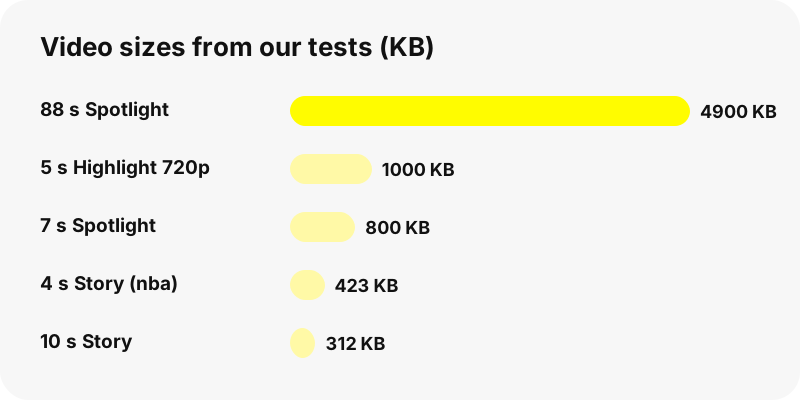
| Spotlight | Recent Spotlight videos with views and length | 540×960 MP4, 6–88 s, 0.8–4.9 MB |
| Highlights | Up to 30 Highlights, 40 snaps each | 480×852 to 720×1280 MP4 |
Want only the Story, in posted order? Use the Snapchat story downloader. A single Spotlight link opens best in the Spotlight downloader, and saved collections in the Highlights viewer.
Can you download all videos of a profile at once?
Yes, one by one. Each tab has a Save all N, one by one button that starts every download in sequence with a pause of about a second between files. Chrome may ask once whether the site can download multiple files; tap Allow.
There is no ZIP. Every video arrives as a separate MP4 with its own name, which is handier on a phone anyway, because Android galleries open MP4 directly and cannot preview inside a ZIP. Keep the tab in front until the button says Done.
Why won't the video download?
- Link older than one hour. Download links expire after an hour. Search the username again.
- Snap removed. If Snapchat deleted the Story snap, it is gone from our list too.
- Private or unknown account. The tool shows a message instead of tabs.
- A blocker or download manager. Some of them intercept file links; try again with them paused.
- Full storage. Free some space; Spotlight files are under 5 MB in our tests, Story clips under 1 MB.
When a profile shows nothing at all, read why a Snapchat profile shows nothing for the common causes.
What quality do you get on Android?
Exactly what Snapchat streams on its public web pages. In our tests Story videos were 480 pixels wide, Highlights up to 720×1280 and Spotlight 540×960. We pass the MP4 through without re-encoding or adding a watermark.
No website can give you a 1080p or 4K version of these clips, because Snapchat does not publish one on the public page. MP4 itself is a widely supported container, as MDN notes, so every Android gallery and video player can open the files with no converter.
Does it work on an Android tablet or Chromebook?
Yes. On an Android tablet the steps are identical to the phone. On a Chromebook the file goes to the Downloads folder in the Files app; Google warns that this folder is temporary and may be cleaned up when space runs low, so move videos you want to keep.
Ready-made guides exist for Chromebook, Windows PC and iPhone, if you also use those.
Is it fine to save other people's Snapchat videos?
Watching and keeping a public clip for yourself is not the same as reposting it. The video belongs to its creator, so ask before you share it elsewhere, and never use a download to follow, track or shame anyone. Our guide on whether downloading Snapchat videos is legal goes into the details.
Creators can remove their public profile from SnapViewer through the opt-out page; their username is then blocked and old links stop working.
Frequently asked questions
How do I download Snapchat videos on Android without an app?
Open SnapViewer in Chrome, type a public username, tap Get videos, then Download under the clip. The MP4 saves to your Download folder.
Where are downloaded Snapchat videos stored on Android?
In the Download folder of internal storage. Open Files by Google, My Files on Samsung, or Chrome › More › Downloads.
Why can't I see the video in Google Photos?
Photos shows the camera first. Open the device folders and pick Download, or turn on backup for that folder.
Do I need to log in to Snapchat?
No. SnapViewer never logs in and needs no account. You only need a public username or link.
Can I download videos from private accounts?
No. Private profiles, friends-only Stories, chats and Memories cannot be reached by SnapViewer or any honest site.
Does it work in Samsung Internet or Firefox?
Yes. The Download button is a normal file link, so any Android browser can save it.
Can I download a Spotlight video from a shared link?
Yes. Paste the Spotlight link and that video is shown alone with its Download button.
Is there a ZIP option?
No. Save all N, one by one downloads each video as a separate MP4.
Why does it say the link expired?
Download links are valid for one hour. Search the username again for fresh ones.
Will the video be HD?
You get Snapchat's own file: 480 to 720 pixels wide for Stories and Highlights and 540×960 for Spotlight in our tests. Nothing is upscaled.
Does the saved video have a watermark?
We add none and do not re-encode the file.
Is SnapViewer part of Snapchat?
No. SnapViewer is an independent tool and is not affiliated with Snap Inc. It only reads public profiles.
Guides
Video downloader — Every video on a public profile, as MP4 files with readable names.
Sources
- Download a file (Chrome for Android) — Google
- View your files (Files by Google) — Google
- Find items from other apps & devices (Google Photos) — Google
- Where to find downloaded files on a Samsung phone — Samsung
- Open, save or delete files on your Chromebook — Google
- Media container formats: MPEG-4 — MDN
- Privacy by Product: Stories — Snap Inc.