What does this Snapchat username search do?
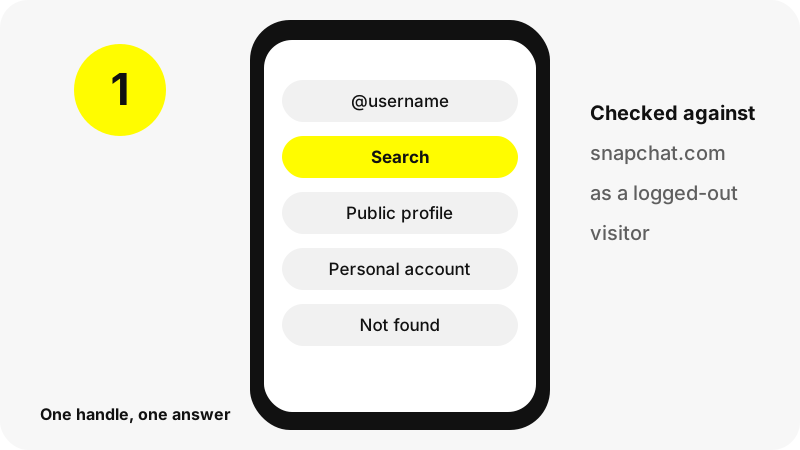
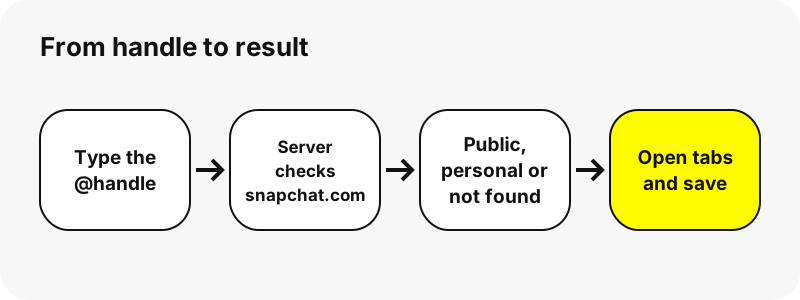
It checks one handle against Snapchat's public web pages and reports what is there. You type a username, our server requests snapchat.com/@username without logging in, and you see the result straight away: a full public profile, a short personal-account card, or a clear not-found message.
It is a precise check, not a guessing game. The search does not suggest similar names, scan lists of users or match partial words. That keeps it honest and fast: one handle in, one real answer out, taken directly from the page Snapchat itself publishes.
What can a username search tell you?
Every search ends in one of three answers. Each one is useful, even the empty one, because it tells you something definite about the handle.
| Answer | What it means | What you see |
|---|---|---|
| Public profile | The owner turned on a Public Profile | Name, @username, subscribers, bio, website, picture, plus Story, Spotlight and Highlights tabs |
| Personal account | The handle exists but is not public | Display name and Bitmoji only, labelled Personal account |
| Not found | Snapchat has no page for that handle | A message asking you to check the spelling |
A personal account is not a failure of the tool. Snapchat simply publishes very little for those, and the Snapchat profile viewer page explains exactly which fields appear on each kind of card.
Can you search Snapchat by name instead of username?
Not on SnapViewer. Display names are not unique, so many people can share one, and Snapchat's public web pages are addressed by username only. Our box therefore needs the exact handle.
Inside the Snapchat app the search is wider. Snap's help page on usernames says so directly:
“You can find others on Snapchat by searching for their Display Name or their latest username.”
So a Snapchat name search belongs in the app, where you are signed in and Snapchat applies its own privacy rules. Once you know the handle, come back here to read the public profile in a browser.
What makes a valid Snapchat username?
Knowing the format helps you spot a typo before you search. Snap lists these rules for new usernames:
- At least 3 characters and no more than 15.
- Latin letters, numbers, and one of the symbols - _ or .; no other special characters.
- Must start with a letter and end with a letter or number.
- Cannot include or be a phone number.
Our search box follows the same idea: it accepts letters, numbers, dots, dashes and underscores, and ignores a leading @. Spaces and emojis are signs you have a display name, not a username. Usernames are not case-sensitive in our search, so KylieJenner and kyliejenner give the same result.
What is the difference between a username and a display name?
This is the most common reason a search fails. People copy the big name at the top of a profile, which is the display name, when the search needs the smaller @handle underneath.
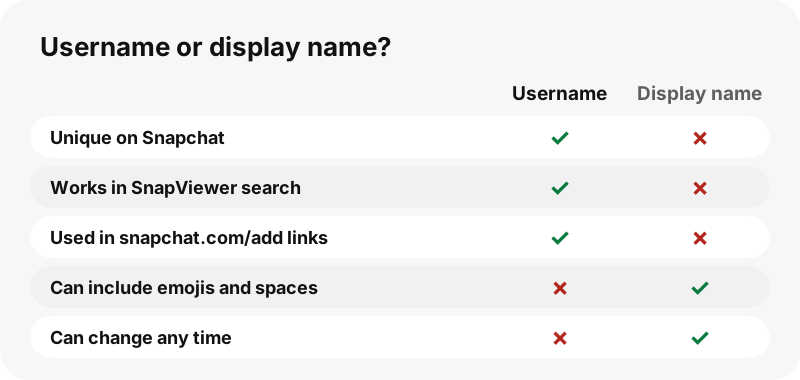
Snap's rules make the split clear: a username is unique and can change only once a year, while a display name can be up to 30 characters, may include emojis and can change any time. When in doubt, look for the @ sign or a snapchat.com/add link.
How do you find someone on Snapchat the right way?
Start from something the person chose to share. Creators and brands usually print their handle or a snapchat.com/add/name link in their bio elsewhere, on a website or on packaging. Snap's help centre confirms that every Snapcode page lives at snapchat.com/add followed by the username.
- Look for an @handle or a snapchat.com/add link the person published.
- Copy it exactly, including dots and underscores.
- Paste it into the box above and press Search.
- If it is a personal account, add them in the app instead; only friends can see personal profiles.
SnapViewer does not search by phone number, email, real name or location, and never will. Those searches belong to the person's own contact settings in Snapchat, not to a public website.
Why does a username search find nothing?
Usually for one of a handful of ordinary reasons. Go through them in order:
| What you see | Likely cause | What to try |
|---|---|---|
| Not found | A typo: one missing dot or underscore is a different handle | Copy the handle again from a link the person shared |
| Not found | You typed the display name, not the @username | Look for the @ sign or a snapchat.com/add link |
| Not found | The owner changed the username (Snap allows it once a year) | Ask for the new handle |
| Refused | The owner opted out of SnapViewer | Nothing; we respect the request |
| Snapchat did not answer | A slow or busy moment on Snapchat's side | Wait a minute and search again |
If the search finds a profile but its tabs are empty, the account is real and simply has nothing public today. The guide on why a Snapchat profile shows nothing covers that case.
What did a real search return in our test?
To show the scale of a full answer, here is one large public profile we searched on 2026-10-30. The whole lookup took about 1.8 seconds, and every number below comes from that single search.
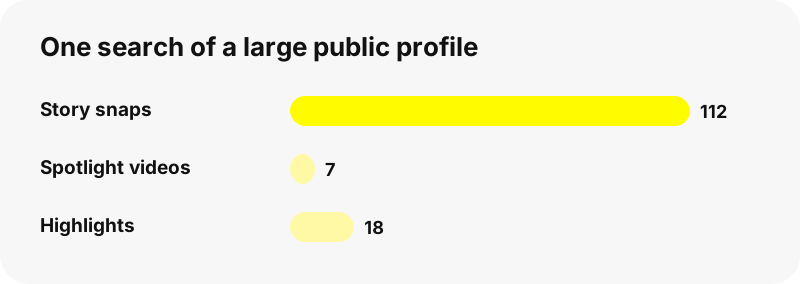
Big profiles are trimmed so the page stays fast on a phone: up to 150 Story snaps, 30 Highlights and 40 snaps per Highlight are listed, with a note when more exist. Smaller accounts usually return a handful of snaps or none at all.
What happens after a successful search?
You get the same result page every SnapViewer tool uses. The card comes first, then tabs you can switch between without searching again.
- Watch or save the public Story with the Snapchat story downloader.
- Save Spotlight clips with the Spotlight downloader.
- Open saved collections in the Snapchat highlights viewer.
- Keep the full-size photo with the Snapchat profile picture viewer.
Each download link stays valid for one hour. The result address can be shared, but it is never listed in search engines.
Does the person know you searched for them?
SnapViewer does not log in to Snapchat and does not use your account, so no Snapchat profile of yours is tied to the search. Our server fetches the public page as a logged-out visitor, and results for the same handle are cached for up to five minutes.
We will not promise anything we cannot check: previews load from Snapchat's media servers, which receive a normal web request. Read how to view Snapchat stories without an account for the full picture.
What will a username search never reveal?
Anything that is not on the public page. That includes private and friends-only content, friend lists (Snap keeps them private for every user), chats, Memories, Snap Map or any location, phone numbers and email addresses.
Sites that offer reverse phone lookups or location results for Snapchat users are making claims no public page supports. Our guide on whether Snapchat viewer sites are safe explains why those offers are a red flag.
Can you search on iPhone, Android and PC?
Yes. The search runs in any current browser, with nothing to install. On a phone, the Paste button fills the box from your clipboard when the browser allows it.
Device walk-throughs: iPhone, Android, Windows PC and Mac. For a list of all devices, see SnapViewer on iPad and on Chromebook.
How should you use what you find?
Respectfully. A public profile is meant to be found, but the person behind it is real. Do not use a search to track, pressure or watch someone, and ask before reposting their snaps.
Account owners who prefer not to appear on SnapViewer can opt out on the opt-out and DMCA page; after that, searching their username returns a refusal.
SnapViewer is an independent tool. It is not affiliated with, endorsed by, or connected to Snap Inc.
Frequently asked questions
Is the username search free?
Yes. No account, no payment and no app. If many searches arrive at once you may be asked to wait a minute.
Can I search Snapchat by real name?
Not here. SnapViewer needs the exact username. Snapchat's own app can search display names for signed-in users.
Can I find a Snapchat account by phone number?
No, and we will never offer it. Snap does not allow usernames to contain phone numbers, and phone lookups are a privacy matter for the account owner's own settings.
Does a capital letter change the result?
No. Our search treats usernames as lowercase, so KylieJenner and kyliejenner return the same profile.
Do I type the @ sign?
Either way works. The tool removes a leading @ before it searches.
Can I paste a snapchat.com/add link?
Yes. Links in the forms snapchat.com/add/name, snapchat.com/@name and story.snapchat.com/@name all open the profile.
What does Personal account mean?
The username exists but is not a Public Profile. Snapchat shows only the display name and Bitmoji for those, so their Stories stay with friends.
Why does a search show not found for a real person?
Check for typos and make sure you used the @username, not the display name. The owner may also have changed the handle.
Can the search show private Stories?
No. Private and friends-only content never appears on the public page, so no search can reveal it.
Does the search show where someone lives or their Snap Map?
No. SnapViewer shows no location of any kind.
Can I see someone's friends after a search?
No. Snapchat keeps friend lists private, visible only to the account owner.
Can I search many usernames at once?
No. The tool checks one handle at a time, which keeps each answer fast and accurate.
Is SnapViewer part of Snapchat?
No. SnapViewer is an independent tool, not affiliated with or endorsed by Snap Inc. It only reads profiles that are already public.
How do I stop my username from showing here?
Use the opt-out page. Once your username is listed, searches for it are refused.
Guides
Story viewer — Type a username to watch a public profile's Stories, Spotlight and Highlights.
Sources
- How do I change my Snapchat username? (username rules) — Snapchat Support
- What is a Display Name on Snapchat? — Snapchat Support
- How to Add Friends on Snapchat — Snapchat Support
- How do I make a Snapcode to share my Public Profile? — Snapchat Support
- What is a Public Profile on Snapchat? — Snapchat Support
- What is Find Friends? (private friend lists) — Snapchat Support
- Username Infringement — Snapchat Support