What does the SnapViewer Snapchat profile viewer do?
It turns a username into a readable profile page. You type a handle, our server opens that account's public page on snapchat.com without logging in, and you get a clean profile card followed by three tabs: the public Story, Spotlight videos and saved Highlights.
Think of it as the public profile, laid out for a browser instead of the app. Nothing is guessed or added: every field you see is a field Snapchat already publishes on the public web page for that account. If Snapchat leaves a field empty, the card simply leaves it out.
Which profiles can a Snapchat profile viewer open?
Only public ones, and that is a rule of Snapchat, not a choice we made. Every account starts private, and a Public Profile is something the owner turns on. Snap's help centre puts the difference in one sentence.
“Only your friends can see your personal profile, but a Public Profile is visible to anyone on Snapchat.”
Snap also says a Public Profile needs the owner to be at least 16, and that local laws can set a higher age. So creators, brands, public figures and adults who opted in show up in full. Most ordinary personal accounts do not, and no honest website can change that.
What is on the profile card?
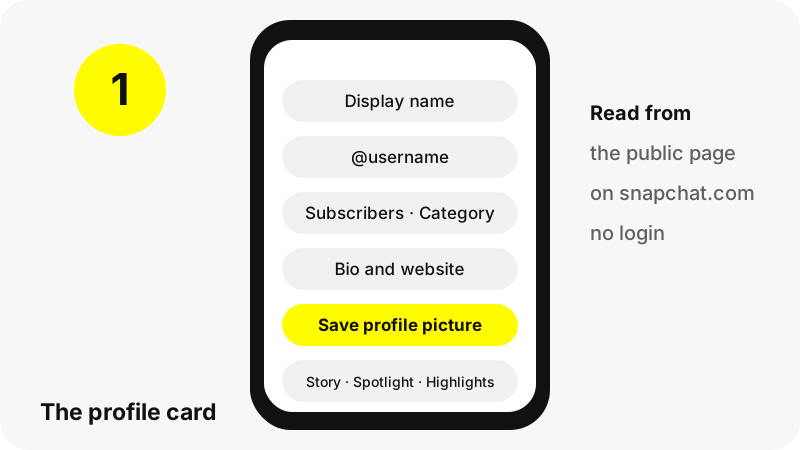
The card at the top gathers the identity fields of a public account. Each one comes straight from the public page; we do not enrich it with data from elsewhere.
| Field | Shown when | Notes |
|---|---|---|
| Display name | Always | The name the owner chose; it does not have to be unique |
| @username | Always | The unique handle, also used in snapchat.com/@name links |
| Subscriber count | The owner shows it | Rounded for big numbers, for example 1.2M |
| Category | Creator or business accounts | Snap says standard Public Profiles cannot pick one |
| Bio and website | The owner filled them in | The website opens in a new tab |
| Profile picture | The owner uploaded one | Saved in its stored size, up to 1080×1080 in our tests |
| Open on Snapchat | Always | A link to the same profile on snapchat.com |
Want only the picture, larger? The Snapchat profile picture viewer opens the card with the photo shown big and the save button first.
What happens with a personal (non-public) account?
You still get an answer, just a short one. For a personal account Snapchat's public page carries only the display name and, when the owner has one, the Bitmoji. SnapViewer shows exactly that, labelled Personal account, and explains that its Stories are for friends.
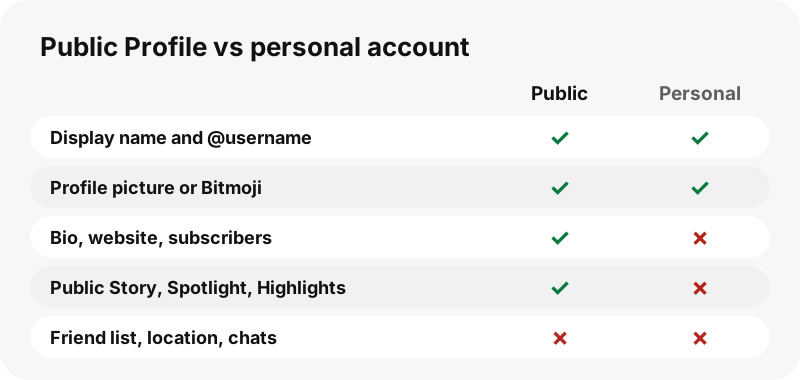
That answer is useful on its own: it tells you the username exists and is not public. The guide on why a Snapchat profile shows nothing explains the other cases, such as a public profile that simply has no Story today.
Can you see Stories, Spotlight and Highlights from the profile?
Yes. Under the card, three tabs show the counts of what the profile has made public right now. The viewer opens the first tab that has something in it.
- Story: every public Story snap, oldest first, with its date (up to 150 listed).
- Spotlight: recent Spotlight videos with views, length and upload date.
- Highlights: saved Highlights by title, then the snaps inside each one (up to 30 Highlights, 40 snaps each).
Each tab has its own dedicated tool if you mostly want one kind of content: the Snapchat story downloader, the Spotlight downloader and the Snapchat highlights viewer.
How does the profile viewer work behind the scenes?
In four plain steps. Your browser sends the username to our server; the server requests snapchat.com/@username as a logged-out visitor; it reads the profile data that page already contains; and your browser draws the card and tabs from that answer.
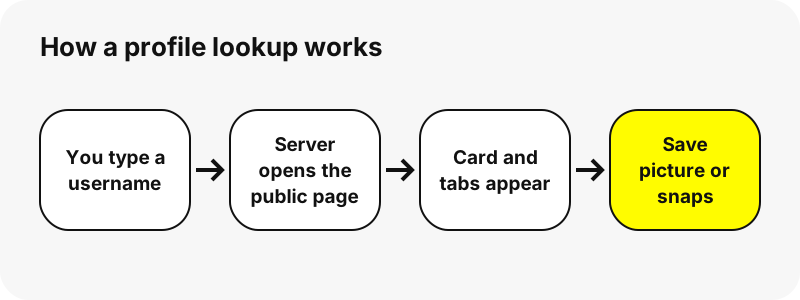
Two details matter. The same username is cached for up to five minutes, so a busy profile is not fetched again for every visitor. And previews load from Snapchat's own media servers, while downloads go through a signed link that expires after one hour. We keep no copy of any file.
What will the viewer never show?
Anything the owner did not make public. This list is short to write and important to state, because some sites promise all of it.
- Private accounts and friends-only Stories.
- Friend lists. Snap says they are private for every user and visible only to the account owner.
- Location or Snap Map positions, chats, Memories or My Eyes Only.
- Who viewed a Story, Snap Score or any account history beyond what the page lists today.
A page that claims to unlock these is either lying or asking for something you should not give it. Our guide on whether Snapchat viewer sites are safe lists the usual warning signs.
Does the account owner know you opened their profile?
SnapViewer never logs in, so no Snapchat account of yours is involved, and we do not add your name to any list. Our server asks for the public page the way a logged-out browser would.
We are careful not to promise more than that. Previews and videos load from Snapchat's media servers, which see an ordinary web request, and we cannot know what Snapchat records on its side. The guide on viewing Snapchat stories without an account goes into the details.
What sizes are the saved files?
The sizes Snapchat stores, unchanged. The biggest surprise is the profile picture: Snapchat's page displays a 90-pixel copy, but the stored file behind it is much larger, and that is the one you save.
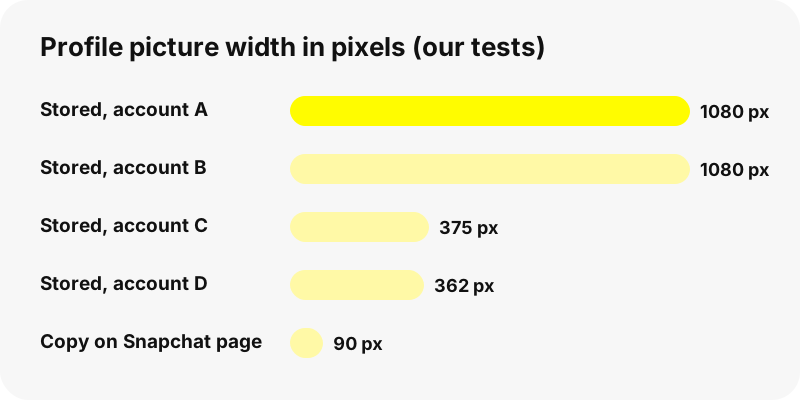
Snaps follow the same rule. In our tests Story photos were 1242×2208 JPG, Story videos 480×270 or 480×852 MP4 with sound, and Spotlight videos 540×960 MP4. We never upscale or relabel files as HD. Snapchat download formats compares every type.
Which links and usernames does it accept?
Most ways people share a Snapchat account. You can paste any of these into the box:
| You paste | What opens |
|---|---|
| kyliejenner or @kyliejenner | That profile |
| snapchat.com/add/name | That profile (Snap's own share link) |
| snapchat.com/@name | That profile |
| story.snapchat.com/@name | That profile |
| snapchat.com/@name/highlight/… | The profile, opened on that Highlight |
| snapchat.com/spotlight/… | That one Spotlight video and its creator |
If you only know part of a handle, try the Snapchat username search page, which explains how to check a spelling and what each answer means.
Does it work on iPhone, Android and computers?
Yes, in any modern browser: Safari, Chrome, Edge or Firefox. There is no app or extension to install. On a phone the card stacks above the tabs; on a computer they sit side by side.
Device pages walk through it step by step: view Snapchat profiles on iPhone, on Android, on PC and on Mac. Saved files go to the browser's download folder; where Snapchat downloads go shows the path on each device.
How should you use a public profile you looked up?
With the same manners you would use in the app. A Public Profile is meant to be seen, so reading it is fine. The content still belongs to its creator: keep saved files for personal viewing and ask before reposting anything.
Never use a viewer to follow, track or pressure a real person. If an account owner does not want their public profile shown here, they can ask us to stop on the opt-out and DMCA page, and SnapViewer then refuses that username.
SnapViewer is an independent tool. It is not affiliated with, endorsed by, or connected to Snap Inc.
Frequently asked questions
Is this profile tool free to use?
Yes. There is no account, no payment and no app. If too many lookups arrive at once you may be asked to wait a minute, but there is no daily cap.
Do I need a Snapchat account to view a profile?
No. SnapViewer reads the public page on snapchat.com as a logged-out visitor, so you never sign in and never share a password.
Can I view a private Snapchat profile?
No. Private accounts and friends-only Stories are never on the public page, so neither we nor any honest website can show them. Sites that promise otherwise are a warning sign.
Why do I only see a name and a Bitmoji?
That account is a personal account, not a Public Profile. Snapchat publishes only the display name and Bitmoji for those, so that is all the card can show.
Can I see someone's friend list?
No. Snapchat keeps friend lists private for every user, visible only to the account owner. SnapViewer has no way to read them and never will.
Does it show where someone is or their Snap Map?
No. SnapViewer shows no location of any kind. The profile viewer only reads the public card, Story, Spotlight and Highlights.
Can I see who viewed a Story or someone's Snap Score?
No. Viewer lists and Snap Score are not part of a public profile page, so the tool does not have them.
Why is the subscriber count missing?
Snapchat lets owners choose whether to show it. When the public page does not include a count, the card leaves the line out rather than guess.
How large is the saved profile picture?
It is the stored size: 1080×1080 pixels for two accounts in our tests, 375×375 and 362×362 for two others. Snapchat's own page displays a 90-pixel copy.
Can I save every Story snap at once?
Each tab has a Save all, one by one button that saves the files in sequence. Your browser may ask once to allow several downloads. There is no ZIP file.
How long do the download links last?
One hour. After that, run the profile again to get fresh links. We store no copies, so the files always come from Snapchat.
Why does a profile I know exist say not found?
Check the spelling first: usernames are exact. The owner may also have changed the username. If it still fails, wait a minute; Snapchat sometimes does not answer right away.
Is SnapViewer part of Snapchat?
No. SnapViewer is an independent tool, not affiliated with or endorsed by Snap Inc. It only reads profiles that are already public.
Can I remove my own profile from SnapViewer?
Yes. Send your username through the opt-out page. Once it is on our list, the tool refuses to load that profile.
Guides
Story viewer — Type a username to watch a public profile's Stories, Spotlight and Highlights.
Sources
- What is a Public Profile on Snapchat? — Snapchat Support
- What features come with a Public Profile on Snapchat? — Snapchat Support
- Why don't I have a Public Profile? — Snapchat Support
- What is Find Friends? (private friend lists) — Snapchat Support
- How do I add a Story to my Public Profile? — Snapchat Support
- What is a Display Name on Snapchat? — Snapchat Support
- Snapchat — Wikipedia