What are Snapchat Highlights?
Highlights are Stories that a creator chose to keep on their Public Profile instead of letting them expire. In the app Snapchat calls them saved Stories; the public web version of a profile lists them as Highlights, each with a title and a cover image. Snap's help page sums up the idea:
“Stories let you showcase collections of your favorite Public Snaps, photos, and videos right on your Public Profile!”
Creators build them by hand, picking snaps or Camera Roll photos and setting a title and cover, or let Snapchat add one automatically every day from their Public Story. Either way, the result stays visible until the owner edits or deletes it.
What does this Snapchat highlights viewer show?
It opens a public profile straight on its Highlights. You see a row of buttons, one per Highlight, each with its cover thumbnail, its title and the number of snaps inside. Tap a button and the snaps appear in order, each with a preview, a date and a Download button.
The profile card stays on top with the name, @username, subscriber count, category and bio, and the Story and Spotlight tabs remain one tap away. Nothing requires a Snapchat account, and SnapViewer never signs in.
How do you view someone's Snapchat Highlights?
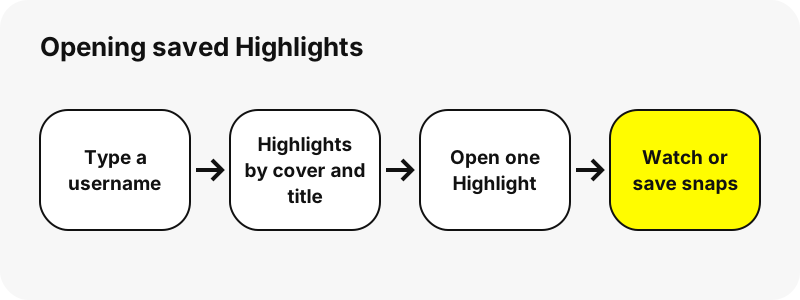
- Copy the username from the profile or a shared link.
- Paste it above and press View Highlights.
- Choose a Highlight from the row of covers; the first one opens by default.
- Press play on a snap to watch it, or the expand symbol to open a photo.
- Press Download to keep a snap, or Save all for the whole Highlight.
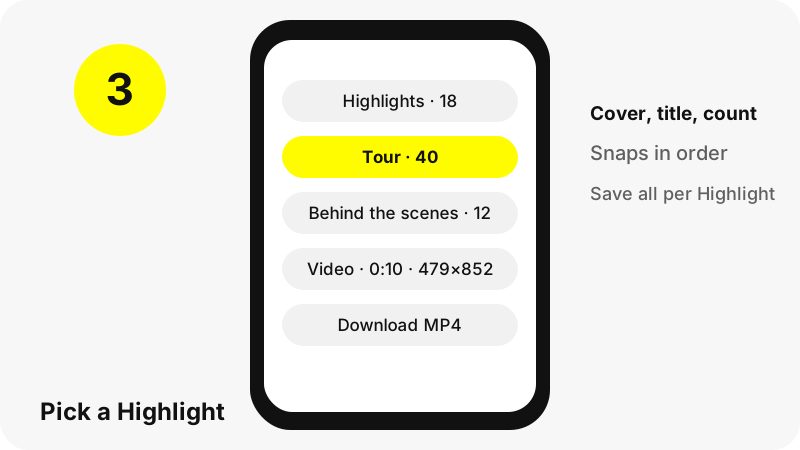
Pasting a Highlight link works too: the profile opens with that exact Highlight already selected, so you do not have to look for it among the others.
Whose Highlights can you see?
Those of public profiles only. Snapchat explains the difference plainly:
“Only your friends can see your personal profile, but a Public Profile is visible to anyone on Snapchat.”
Public Profiles are open to people aged 16 and over who switch them on, plus creators and businesses. Snapchatters under 16 use My Profile, where saved Stories are visible to friends only, so a Snapchat highlights viewer cannot show them. Private accounts, chats and Memories are equally out of reach.
How are Highlights different from the Story?
| Story | Highlights | |
|---|---|---|
| What it is | Snaps posted recently | Stories saved to the profile |
| How long it lasts | Most delete after 24 hours | Until the owner deletes them |
| Organised by | Posting time, oldest first | Title and cover chosen by the owner |
| Listed by SnapViewer | Up to 150 snaps | Up to 30 Highlights × 40 snaps |
| Tool page | Story downloader | This Highlights viewer |
In short, the Story is today's feed and Highlights are the archive the creator chose to keep. If a Story you remember is gone, check the Highlights: the owner may have saved it.
How many Highlights and snaps are listed?
Up to 30 Highlights per profile and up to 40 snaps in each. These limits keep the page light enough for a phone; some celebrity profiles hold hundreds of saved snaps.
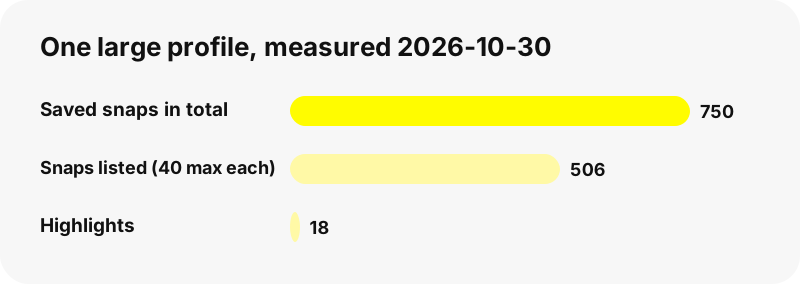
In our largest test on 2026-10-30, one profile had 18 Highlights holding 750 snaps in total. The viewer listed all 18 and showed 506 snaps, the first 40 of each long Highlight. When a Highlight is trimmed, a note above the grid tells you how many snaps are listed out of the total.
What quality are Highlight files?
The same files Snapchat plays, unchanged. Highlight snaps came in a wider range of sizes than Story snaps in our tests, because each one keeps the format of the moment it was posted:
| Snap | Format | Size on screen | File size |
|---|---|---|---|
| Highlight video | MP4 | 720×1280, 5 s | 1.0 MB |
| Highlight video | MP4 | 479×852, 10 s | 704 KB |
| Highlight video | MP4 | 480×852, 10 s | 288 KB |
| Highlight photo | JPG | 720×1279 | 257 KB |
There is no 1080p or 4K copy to unlock, and we never upscale a file. All formats side by side: Snapchat download formats.
How are saved Highlight files named?
Each file is named after the profile, the Highlight's title and the snap's position, following the pattern username_highlight-title_n with .mp4 or .jpg at the end. A snap from a Highlight called Tour saved from the nba profile would read like nba_Tour_4.jpg.
Keeping the title in the name means a folder of downloads stays grouped by Highlight. Your browser treats the name as a suggestion and may swap characters that your system does not allow in file names.
Can you save a whole Highlight?
Yes. When a Highlight is open, the Save all button above its snaps downloads them one after another with a short pause between files. Your browser may ask once whether the page may save several files.
We do not offer a ZIP, since that would mean storing the files on a server and SnapViewer keeps nothing. Downloads land in your usual folder: Downloads on a computer, Files › Downloads on iPhone. Device steps: Highlights on iPhone, Android, PC.
Why does a profile have no Highlights?
- The creator never saved a Story to the profile. Snap notes that only content saved on purpose stays there.
- The account is personal or under 16, so nothing is public.
- The owner deleted their saved Stories or cleared the profile.
- Snapchat was slow to answer; try again in a minute.
- The owner asked SnapViewer not to show the profile.
Snaps labelled Limited Reach are also left out of Stories that Snapchat saves automatically. More causes in why a Snapchat profile shows nothing; to set up your own, see how to make a public profile on Snapchat.
What can a highlights viewer not show?
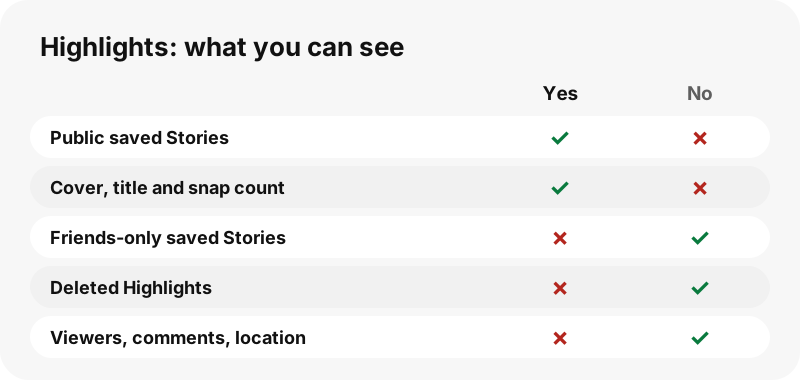
- Friends-only saved Stories on under-16 profiles.
- Highlights the owner deleted; there is no hidden archive.
- Who viewed a Highlight, comments, locations or friend lists.
- Private accounts, chats or Memories.
Is it okay to browse and save Highlights?
Highlights are made to be seen: creators save them so new visitors can catch up. Watching them is exactly their purpose. Saving a snap for yourself is usually fine, but the content belongs to its creator, so ask before reposting or reusing it.
Please do not use the viewer to monitor a person. Owners can ask us to stop showing their profile through the copyright and opt-out page. More in is it legal to download Snapchat videos.
Which SnapViewer tools go with Highlights?
- Snapchat story viewer: the full public profile, Story first.
- Snapchat Spotlight downloader: public Spotlight videos as MP4.
- Snapchat video downloader: every video on the profile.
- Profile picture viewer: the picture in its stored size.
Frequently asked questions
Is the Snapchat highlights viewer free?
Yes. No account, no payment, no app. Type a username and press View Highlights.
Can I view Snapchat Highlights without an account?
Yes. SnapViewer never signs in to Snapchat. It reads the public profile page anyone can open in a browser.
Will the creator know I viewed their Highlights?
We open the page without an account, so your name is not added anywhere by us. We cannot speak for what Snapchat logs on its servers.
Can I see Highlights of a private account?
No. Only public profiles have Highlights visible to everyone. Private and under-16 profiles show saved Stories to friends only.
What is the difference between a Story and a Highlight?
A Story holds recent snaps and most of it deletes after 24 hours. A Highlight is a Story the owner saved to the profile, which stays until they remove it.
Can I download Snapchat Highlights?
Yes. Each snap has a Download button that saves the MP4 or JPG Snapchat serves, and Save all downloads a whole Highlight one file at a time.
Does a Highlight link work?
Yes. Paste a snapchat.com/@name/highlight/ link and the profile opens with that Highlight selected.
Why are only 40 snaps shown in a Highlight?
To keep the page fast on phones, each Highlight lists its first 40 snaps. A note tells you the full total when a Highlight is longer.
How many Highlights can I see?
Up to 30 per profile, each with its cover, title and snap count.
What quality are Highlight downloads?
The original file: in our tests videos from 479×852 to 720×1280 and photos at 720×1279. Nothing is upscaled.
Can I see deleted Highlights?
No. Once the owner deletes a saved Story, it is gone from Snapchat's public page and from SnapViewer.
Why did a download link stop working?
Links expire one hour after you search. Search the username again for fresh ones.
Is SnapViewer part of Snapchat?
No. SnapViewer is an independent tool and is not affiliated with, endorsed by, or connected to Snap Inc. It only reads public profiles.
How do I hide my Highlights from SnapViewer?
Contact us through the copyright and opt-out page with your username and proof you own it. We then refuse your profile.
Guides
Story viewer — Type a username to watch a public profile's Stories, Spotlight and Highlights.
Sources
- How do I add a Story to my Public Profile? — Snapchat Support
- How do I auto-save Stories to my Public Profile? — Snapchat Support
- What is a Public Profile on Snapchat? — Snapchat Support
- What is My Profile and who can see it? — Snapchat Support
- Privacy by Product: Stories — Snap Inc.
- Where to find downloads on your iPhone or iPad — Apple
- JPEG — Wikipedia
- <a>: The Anchor element (download attribute) — MDN Web Docs