What is the SnapViewer Snapchat story downloader?
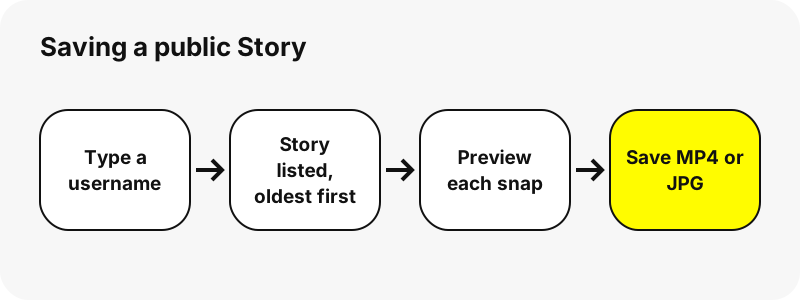
It is a web page that saves the snaps of a public Snapchat Story. You give it a username, it reads that profile's public page on snapchat.com without logging in, and it lists the current Story snap by snap, each with a preview, a date and a Download button.
Photos are saved as JPG and videos as MP4, in the exact form Snapchat delivers them. We add nothing to the file and keep no copy. The download travels from Snapchat's media servers to your device through a signed link that works for one hour.
Which Stories can you save?
Public ones only. A Story is listed when it belongs to a public profile, such as a creator, a brand, a sports team or anyone aged 16 or over who switched on a Public Profile. If the snaps can be seen at snapchat.com/@username without signing in, the downloader can normally save them.
Stories shared only with friends, private accounts and accounts under 16 are not public. Snapchat's own help page explains that under-16 accounts use a friends-only profile, so their content never appears on the open web. Neither SnapViewer nor any honest tool can reach it.
Want to see the profile before saving? The Snapchat story viewer shows the same Story for watching only, and the profile viewer focuses on the card.
How do you download a Snapchat Story step by step?
- Find the username on the profile or in a shared link.
- Paste it above and press Get Stories.
- The profile card appears; the Story tab opens with the snap count.
- Tap the play symbol on a snap to watch it or open the full photo.
- Press Download under the snap you want to keep.
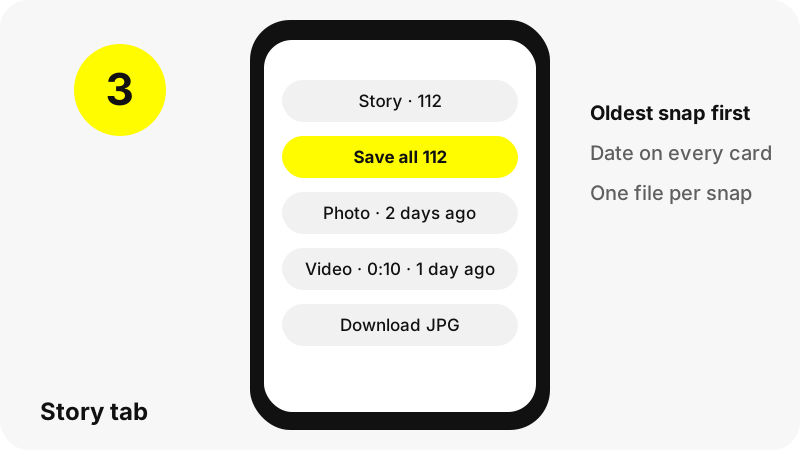
On iPhone, Safari may show a short confirmation before saving. On Android and on computers the file usually saves straight away. To grab everything, use the Save all button above the list.
How long do you have before a Story is gone?
Often about a day. Snapchat says most Stories delete after 24 hours unless the owner saves them to the Public Profile, so a Snapchat story downloader is most useful soon after a snap is posted.
Public profiles can keep snaps longer. In our test on 2026-10-30, one large profile still listed Story snaps posted about six days earlier. Owners can also turn on a setting that saves the day's Story to their profile automatically:
“When enabled, a new Story will be added to your Public Profile every day at midnight using Snaps from your Public Story over the last day.”
Those saved Stories appear in our Snapchat Highlights viewer. More on timing in how long Snapchat Stories last.
In what order are Story snaps listed?
In the order Snapchat plays them: oldest first, newest last, the same sequence a viewer taps through. Each card shows how long ago the snap was posted, for example 3 hours ago or 2 days ago, so you can find the one you want without playing them all.
The list holds up to 150 snaps. Very active profiles can post more than that; when this happens, a note above the grid tells you how many were listed out of the total. In our biggest test, a celebrity profile listed 112 Story snaps: 76 videos and 36 photos.
| Tab | What it holds | How long it stays | Listed up to |
|---|---|---|---|
| Story | Snaps posted recently to the public Story | Often 24 hours; longer on some public profiles | 150 snaps |
| Highlights | Stories the owner saved to the profile | Until the owner deletes them | 30 Highlights × 40 snaps |
| Spotlight | Videos submitted to Spotlight | Until the owner deletes them | 60 videos |
What files does the story downloader save?
The original file for each snap, unchanged. Here is what we measured through our download link on 2026-10-30:
| Snap type | Format | Size on screen | File size |
|---|---|---|---|
| Story photo | JPG | 1242×2208 | 174–216 KB |
| Story video | MP4 with AAC sound | 480×270, 10 s | 312 KB |
| Story video | MP4 with AAC sound | 480×852, 4 s | 423 KB |
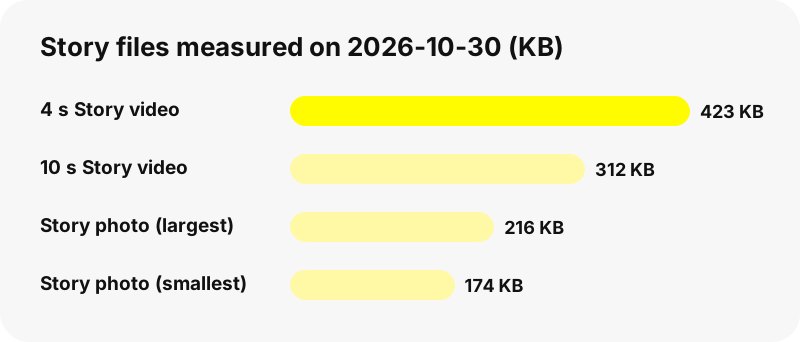
Photos are surprisingly sharp because Snapchat keeps them near phone-screen size. Videos are compressed for mobile data, so expect modest resolution. See Snapchat download formats for all file types.
What are the saved Story files named?
Each Story file is named after the profile, the word story, the posting time and its position, for example nba_story_20261029-181502_3.mp4. The pattern is username_story_YYYYMMDD-HHMMSS_n followed by .mp4 or .jpg.
Because the posting time is part of the name, files sort in the same order as the Story in any folder view. That makes it easy to keep a day's snaps together or spot a duplicate. Browsers treat the name as a suggestion and may replace characters your system forbids.
Can you save a whole Story at once?
Yes. Above the Story grid, the Save all button downloads every listed snap one after another, with a pause of about a second between files. The first time, your browser may ask whether the page may download multiple files; allow it once.
There is no ZIP archive, by design. A ZIP would have to be built and stored on a server, and SnapViewer stores nothing. You receive the original files individually, each with its readable name, which is also friendlier on phones that cannot open archives easily.
Where do downloaded Stories go on your device?
Wherever your browser saves downloads. On computers that is the Downloads folder. On Android, Chrome uses the Download folder and the Files app. On iPhone and iPad, Apple describes it like this:
“If you download a file onto your iPhone or iPad from the internet, you can find it in your Downloads folder in the Files app.”
To put a snap in Photos, open it in Files and choose Share › Save Image or Save Video. Device guides: iPhone, Android, PC, and where Snapchat downloads go.
Why does the Story tab show nothing?
- No Story right now. The profile is public but has not posted in the last day or so. Check Highlights and Spotlight.
- Personal account. Snapchat shows only a name and Bitmoji for these.
- Wrong or changed username. Try the Snapchat username search.
- Snapchat was slow. Wait a minute and press the button again.
- Owner opted out. We refuse profiles whose owners asked to be removed.
Each case is explained in why a Snapchat profile shows nothing.
What can a Story saver not do?
A lot of sites oversell. Here is what no public tool, ours included, can deliver:
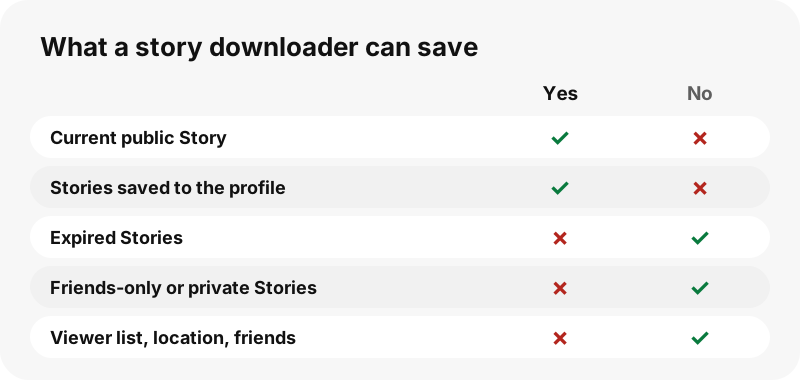
- Private or friends-only Stories, chats, Memories.
- Old Stories that Snapchat already deleted; there is no hidden story history.
- Who viewed a Story, location, Snap Map or friend lists.
- HD or 4K copies; the file is the one Snapchat stores.
Is it fine to save someone's Snapchat Story?
Keeping a public snap for yourself is generally accepted, and Snap itself notes that anyone can screenshot or record a Story. Reposting or reusing it is different: the snap belongs to the person who made it, so ask before sharing it anywhere.
Please do not use the tool to watch a specific private person over time. Profile owners can ask us to stop showing them on our copyright and opt-out page. The legal background is in is it legal to download Snapchat videos.
Which SnapViewer tools pair well with the story downloader?
- Snapchat video downloader: puts videos before photos.
- Snapchat Spotlight downloader: Spotlight videos with views and length.
- Snapchat Highlights viewer: Stories the owner saved to the profile.
- Profile picture viewer: the picture in its stored size.
Frequently asked questions
Is this Story saver free?
Yes. No account, no payment and no app. The only limit is a short pause when too many lookups arrive at once.
Can I download Snapchat Stories without logging in?
Yes. SnapViewer never asks for Snapchat credentials and never signs in. It reads the public profile page anyone can open.
Can I download a private Snapchat Story?
No. Friends-only Stories and private accounts are not public. Any site promising them is misleading you.
Will the person see that I saved their Story?
Our server opens the public page without an account, so your name is not added to any list by us. We cannot vouch for what Snapchat logs itself.
How long are Snapchat Stories available?
Snap says most delete after 24 hours unless saved to the Public Profile. Public profiles in our tests sometimes kept snaps for several days.
Can I download Stories that already expired?
No. Once Snapchat removes a snap, it is gone from our list as well. If the owner saved it to the profile, try the Highlights tab.
What format are saved Stories?
Photos are JPG (1242×2208 in our tests) and videos are MP4 with sound. We do not convert or upscale anything.
Can I save every snap in a Story at once?
Yes, with Save all. Files download one by one; allow multiple downloads if your browser asks. There is no ZIP.
Why does a Story file name contain a date?
It is the time the snap was posted, so files sort in Story order in any folder.
Does it work on iPhone?
Yes, in Safari or any other browser. Downloads land in the Files app under Downloads, and you can move them to Photos from there.
How many Story snaps can be listed?
Up to 150 per profile. If a profile has more, a note shows how many were listed out of the total.
Why did my download link expire?
Links are signed for one hour. Search the username again to get new ones.
Is SnapViewer part of Snapchat?
No. SnapViewer is an independent tool and is not affiliated with, endorsed by, or connected to Snap Inc. It only reads public profiles.
How do I remove my Stories from SnapViewer?
Contact us through the copyright and opt-out page with your username and proof you own it. We then block the profile and old links stop working.
Guides
Story viewer — Type a username to watch a public profile's Stories, Spotlight and Highlights.
Sources
- Privacy by Product: Stories — Snap Inc.
- How do I auto-save Stories to my Public Profile? — Snapchat Support
- What is My Profile and who can see it? — Snapchat Support
- What is a Public Profile on Snapchat? — Snapchat Support
- Where to find downloads on your iPhone or iPad — Apple
- Download a file (Chrome on Android) — Google
- JPEG — Wikipedia
- <a>: The Anchor element (download attribute) — MDN Web Docs