What is a Snapchat public profile?
A Snapchat public profile is an opt-in page that anyone can open, on the app or on the web, without being your friend. It holds a photo, a bio, public Stories, saved Stories, Spotlight videos and Lenses, and people can subscribe to it instead of adding you as a friend.
Every account starts private. Snap's help centre puts the rule this way:
“All Snapchatters have a private profile by default, but those who are 16+ can decide to use their Public Profile.”
Your ordinary profile, the one friends see, keeps working next to it. Turning on the public one adds a second, open page; it does not throw your friend list or chats open to strangers.
Who can make a public profile?
Snapchatters aged 16 or older can, although laws in some countries set a different minimum age. Accounts that broke the Community Guidelines in the past may not get the option at all.
“Not every Snapchat account comes with a Public Profile.”
If you meet the age rule and still do not see the option, Snap suggests checking that your birthday is set in the app's settings. Under-16s get My Profile instead: a content page whose saved Stories and Spotlight posts are visible to friends only.
How do you make a Snapchat public profile, step by step?
The setup happens inside the Snapchat app and takes a few minutes. These steps follow Snap's own help articles, read on 2026-10-30; menu names can change between app versions.
- Open Snapchat and tap your Bitmoji in the top-left corner of the screen.
- Select My Public Profile. If it is missing, check your birthday in settings and the age rule above.
- Add a profile photo, a background photo and a short bio, the basics Snap recommends filling in.
- Post a first Snap to My Story · Public from the Send To screen, or add a saved Story to the profile.
- Use the profile's preview option to check how it looks to other people before you share the link.
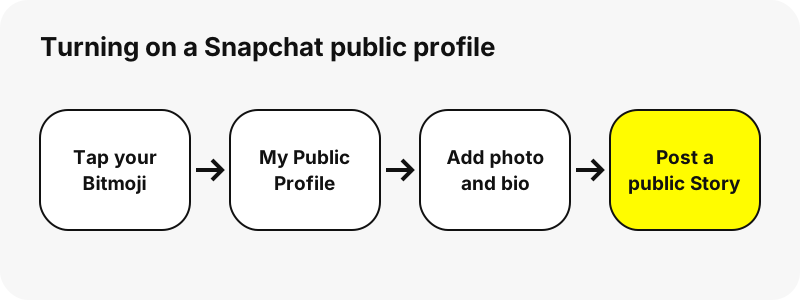
Once it is live, your profile has a web address in the form snapchat.com/@username. That is the link people paste into a Snapchat profile viewer or open directly in a browser.
What features come with a public profile?
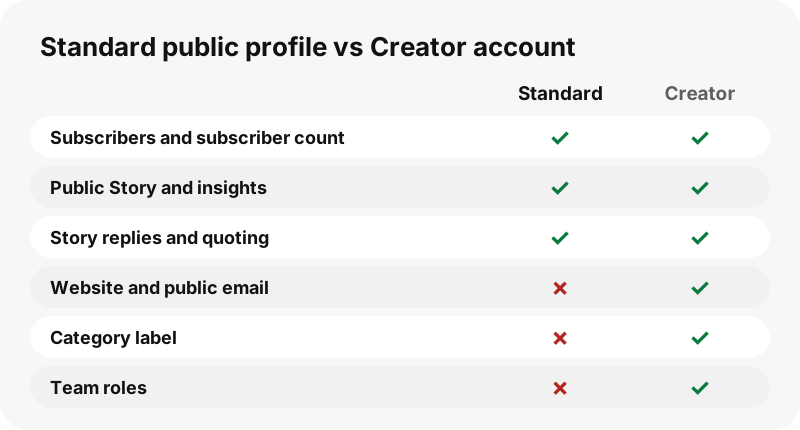
A standard public profile covers the essentials; a Creator account or a Business profile adds extras. The table is based on Snap's feature list for public profiles.
| Feature | Standard public profile | Creator account |
|---|---|---|
| Photo, bio, Stories and Lenses on the profile | Yes | Yes |
| People can subscribe; subscriber count shown | Yes | Yes |
| Public Story separate from My Story | Yes | Yes |
| Story, Lens and audience insights | Yes | Yes |
| Public Story replies and quoting | Yes | Yes |
| Website and public email on the profile | No | Yes |
| Category label | No | Yes |
| Roles for a team | No | Yes |
Businesses create their Business Profile themselves in Ads Manager; Snapchat does not make one for them automatically. If you never did that, your public profile is a standard one.
Does a public profile make your whole account public?
No, and this is the part people worry about most. Snap is explicit that switching it on does not loosen any setting you already had:
“Creating a Public Profile does not change any existing contact or Story privacy settings.”
Snaps you send to My Story · Friends stay with friends. Chats, Memories, your friend list and your Snap Map settings are all separate controls. Only what you deliberately post to My Story · Public, save to the profile or submit to Spotlight becomes public.
What can people see on your public profile?
Anyone who opens the profile sees the public card and public content, whether they use the app, a browser or a viewer such as SnapViewer. This is what a visitor with no account receives:
| Visible to anyone | Stays private |
|---|---|
| Display name, @username and profile photo | Your friend list |
| Bio, and website or category on Creator and Business profiles | Chats and Snaps sent to friends |
| Subscriber count, when you show it | My Story · Friends, Private and Shared Stories |
| Active public Stories | Memories |
| Stories saved to the profile (Highlights) | Your location, unless you post to Snap Map yourself |
| Public Spotlight videos | — |
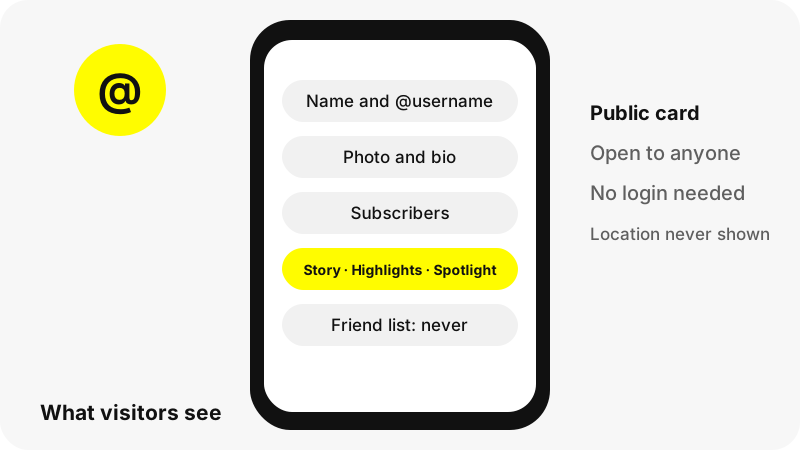
Snap lets you add a location to the profile itself. SnapViewer never reads or displays any location, and it never shows Snap Map content.
How do you add Stories that stay on the profile?
Public Stories expire like any Story, so anything you want to keep must be saved to the profile. Snap's note on this is short: only content you proactively save remains.
- Go to your profile and tap Public Profile.
- Tap Add a Story to your Profile.
- Choose Snaps or Camera Roll photos, then tap Add.
- Review the Story and tap Next.
- Set a title and cover, then tap Finish.
There is also an auto-save setting. When it is on, Snapchat adds a new Story to your profile every day at midnight from your Public Story snaps of the last day, and notifies you each time. On SnapViewer, these saved Stories show up in the Highlights tab.
How do you get Spotlight videos onto your profile?
Spotlight is Snapchat's public video feed, and posts from a public profile can be shown on it. When you post, Snap gives users aged 16 and over a choice to show the Snap on their public profile; it is on by default from 18 and off by default for 16 to 17 year olds.
Spotlight posts need to be videos of at least five seconds when you use the camera's Post button. Our guide what is Snapchat Spotlight covers the rules, and the Spotlight downloader shows how those videos look to a visitor.
How do you check what strangers see?
Use the preview inside your public profile settings first, since that is Snap's own view. Then test from outside the app: open snapchat.com/@yourname in a private browser window, or type your username into SnapViewer.
If the card, the Story tab and the Spotlight tab show what you expected, your public profile is working. If they show only a name and Bitmoji, the account is still personal, and why a Snapchat profile shows nothing explains the other possible causes.
Lookups are cached for up to five minutes, so a change you just made may take a moment to appear on SnapViewer.
How do you remove or clear a public profile?
Snap offers a Clear Public Profile option. It permanently removes your bio, photo, public Stories and saved Stories, but keeps your username and account. Spotlight and Snap Map posts are not deleted by clearing; you remove those separately.
- Go to your public profile.
- Tap the three-dot menu at the top right to open Public Profile Settings.
- Scroll down and tap Clear Public Profile.
- Confirm.
Once cleared, SnapViewer can no longer show that content, because Snapchat no longer publishes it. If you prefer to stay public on Snapchat but not appear on our site, use the opt-out procedure and we will refuse your username.
Should you make your profile public?
It suits people who want an audience: creators, local businesses, artists and anyone who wants subscribers rather than mutual friends. It also gives you insights into who watches your public content, which a personal account never shows.
It is a worse fit if you mostly snap with friends. Everything public can be screenshotted, recorded and saved by anyone, and public Spotlight posts can be shared off Snapchat. Post publicly only what you are happy to see travel.
SnapViewer is independent and is not affiliated with, endorsed by, or connected to Snap Inc. The steps above summarise Snapchat's help centre; check it for the latest menu names.
Frequently asked questions
How old do you have to be for a public profile on Snapchat?
At least 16 according to Snap, although local laws can set a different minimum age. Under-16s get My Profile, which is visible to friends only.
Why can't I find the public profile option?
You may be under the age limit, your birthday may not be set in settings, or the account may have broken the Community Guidelines in the past.
Does a public profile show my location?
Only if you add one to the profile yourself. SnapViewer never reads or shows any location or Snap Map content.
Can strangers see my friends-only Stories after I go public?
No. Creating a public profile does not change your existing Story or contact privacy settings.
Is a public profile the same as a Creator account?
Not exactly. A Creator account is a public profile with extras such as a website, a category and team roles.
How do people find my public profile?
Snap says people can follow you from Spotlight, Discover or the Add button on your profile, and you can share your snapchat.com/@username link. Outside the app, anyone can open that link in a browser.
Do public Stories disappear after 24 hours?
Active public Stories expire, but Stories you save to the profile stay until you remove them.
Can I switch back from a public profile?
You can clear it at any time. Users who upgraded from My Profile cannot go back to My Profile, according to Snap.
Does clearing the profile delete my Spotlight videos?
No. Spotlight and Snap Map posts stay until you delete them in the Spotlight & Snap Map section.
Can I see how my profile looks without an account?
Yes. Open snapchat.com/@yourname in a private window, or type the username into SnapViewer.
Is SnapViewer part of Snapchat?
No. SnapViewer is an independent tool and is not affiliated with Snap Inc. It only reads public profiles.
How do I stop my public profile from appearing on SnapViewer?
Write to us through the copyright and opt-out page. After we confirm the account is yours, the tool refuses your username.
Guides
Profile viewer — See a public profile's name, bio, subscribers and picture in one card.
Sources
- What is a Public Profile on Snapchat? — Snapchat Support
- What features come with a Public Profile on Snapchat? — Snapchat Support
- Why don't I have a Public Profile? — Snapchat Support
- How do I add a Story to my Public Profile? — Snapchat Support
- How do I auto-save Stories to my Public Profile? — Snapchat Support
- How do I delete or clear my Public Profile? — Snapchat Support
- What is My Profile and who can see it? — Snapchat Support
- How do I post Snaps to Spotlight? — Snapchat Support
- What's the difference between posting to My Story · Public and My Story · Friends? — Snapchat Support