Where does the file go on Android?
The default folder
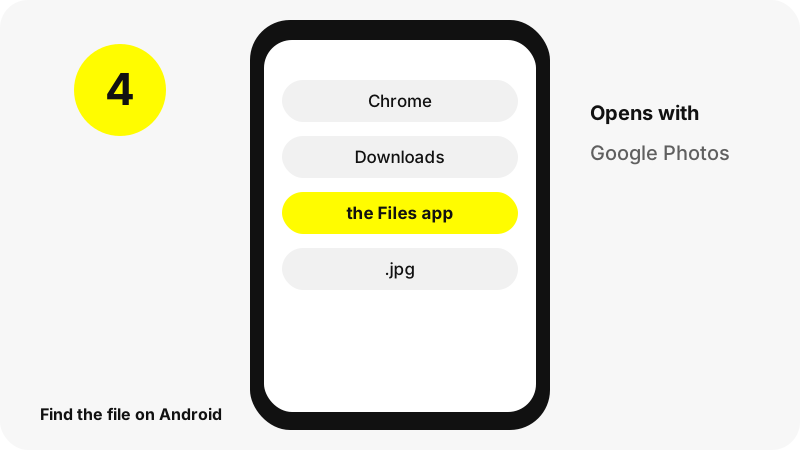
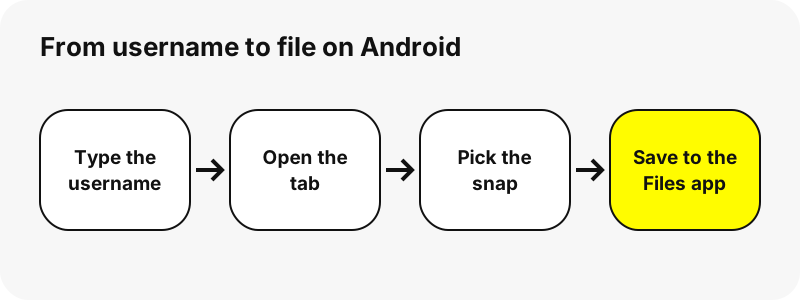
Chrome for Android saves the file to the phone's default download location; Google says every downloaded file can be found in the Files app.
Finding it right after the download
In Chrome, tap More (top right) › Downloads. Files by Google also lists new downloads under Recents.
Android at a glance
| Question | Answer on Android |
|---|---|
| Browser | Chrome |
| Where the file lands | Chrome for Android saves the file to the phone's default download location; Google says every downloaded file can be found in the Files app. |
| How to see it | In Chrome, tap More (top right) › Downloads. Files by Google also lists new downloads under Recents. |
| Opens with | Google Photos (On this device) or Files |
| Change the folder | Chrome uses the phone's default download location. |
What do you get?
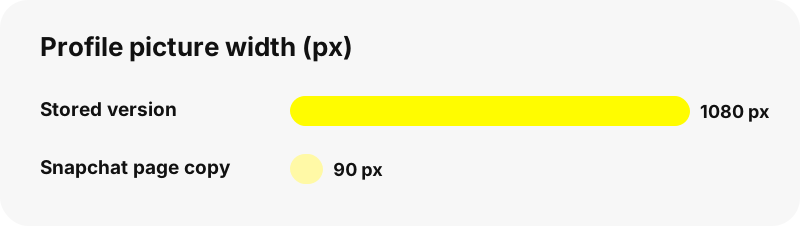
Snapchat's profile page loads a small copy of the profile picture (90×90 pixels in our test). SnapViewer asks Snapchat's image server for the stored version instead: 1080×1080 pixels (128 KB JPG) for one account in our tests, 362×362 and 375×375 for two others, because the stored size depends on what the owner uploaded. Only public profiles show a profile picture to everyone.
| Detail | Profile Photos from Snapchat |
|---|---|
| File extension | .jpg |
| Format | the profile picture as a JPG in its stored size |
| Largest version | the stored size of the picture, up to 1080×1080 in our tests (it varies by account; the profile page itself shows a 90-pixel copy) |
| Opens on Android with | Google Photos (On this device) or Files |
| Preset on this page | Profile picture viewer |
Which app opens it on Android?
Google Photos (On this device) or Files.
How do you keep it with your photos?
Google Photos shows pictures and videos saved by other apps under Collections › On this device (device folders), so a downloaded file can be viewed there.
What should you know on Android?
Google's help does not give one fixed folder path because phone makers choose it; open the Files app and look at Recents.
What if the download does not show up on Android?
- Check the Files app first: In Chrome, tap More (top right) › Downloads. Files by Google also lists new downloads under Recents.
- Make sure the profile is public. Friends-only Stories and private accounts cannot be read without logging in, and this tool never asks for a Snapchat password.
- Download links expire after one hour. If a button stops working, look the username up again.
- Stories disappear from Snapchat after a while; if a snap is gone from the profile, it is gone here too.
What else can you save on Android?
Which other devices are covered?
Other tools
Frequently asked questions
Where do downloaded Snapchat profile pictures go on Android?
Chrome for Android saves the file to the phone's default download location; Google says every downloaded file can be found in the Files app.
How do I find a downloaded Snapchat file on Android?
In Chrome, tap More (top right) › Downloads. Files by Google also lists new downloads under Recents.
Which app opens the file on Android?
Google Photos (On this device) or Files.
Can I choose another download folder on Android?
Chrome uses the phone's default download location.
What is the best quality I can get?
The stored size of the picture, up to 1080×1080 in our tests (it varies by account; the profile page itself shows a 90-pixel copy). The tool never upscales a file or relabels it as HD or 4K.
Do I need an app or a Snapchat account?
No. It runs in the browser (Chrome), with no sign-up and no app to install.
Is SnapViewer part of Snapchat?
No. SnapViewer is an independent tool and is not affiliated with Snap Inc. It only reads public profiles.
Can I see private or friends-only content?
No. Only public profiles and public Stories can be read without logging in. Anything shared with friends only is out of reach, by design.
Why is the picture sharper than on Snapchat's page?
The page shows a 90-pixel copy; the tool asks for the stored version, up to 1080×1080 in our tests. It is the same picture, not an upscale.
Can I see the profile picture of a private account?
No. Personal accounts do not show a profile photo to the public, and the tool cannot get around that.
Guides
Profile picture — Open a public profile picture in its stored size and save it.