What does this Snapchat video downloader do?
It turns a username into a list of videos you can save. SnapViewer opens the public profile page on snapchat.com without logging in, reads the Story, Highlights and Spotlight that Snapchat already shows to everyone, and gives each video its own player and Download button.
The difference from the Snapchat story viewer on our home page is the order: on this page the Story tab lists every video before the photos, so a profile with a mix of both shows the clips you came for at the top. Everything else works the same way.
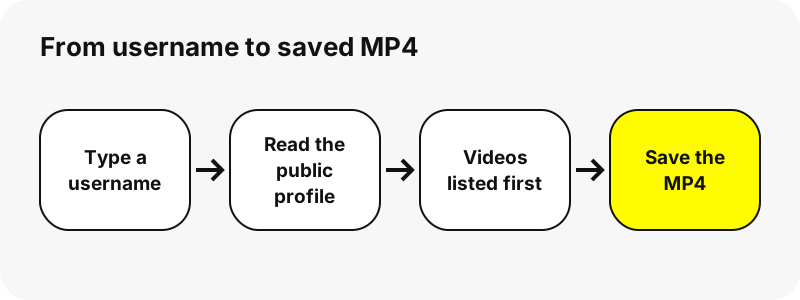
There is no account, no app, no browser extension and no limit on the number of profiles you look up, apart from a short pause when too many requests arrive at once. Nothing is stored on our side: the file streams from Snapchat's servers through a signed link.
Which Snapchat videos can you download?
Only videos that are public. That means the current Story of a public profile, the Stories its owner saved to the profile (shown as Highlights), and Spotlight videos posted with the profile visible. If you can watch it at snapchat.com/@username without signing in, the tool can usually list it.
Snapchat itself draws the line. Its help centre explains that personal profiles are for friends, while a Public Profile is open to everyone:
“Only your friends can see your personal profile, but a Public Profile is visible to anyone on Snapchat.”
Snaps sent in chat, friends-only Stories, Memories and anything from a private account are never reachable. No honest downloader can get them, and a site that says otherwise is worth avoiding; our guide on whether Snapchat viewer sites are safe lists the usual tricks.
How do you download a Snapchat video step by step?
- Copy the username from the profile, a share message or the snapchat.com/@name address.
- Paste it into the box at the top of this page and press Get videos.
- Wait about a second while the public profile is read. The profile card appears with three tabs.
- Open Story, Spotlight or Highlights. Each card shows the type, length or size and the date.
- Press the play button to check the clip, then press Download under it.
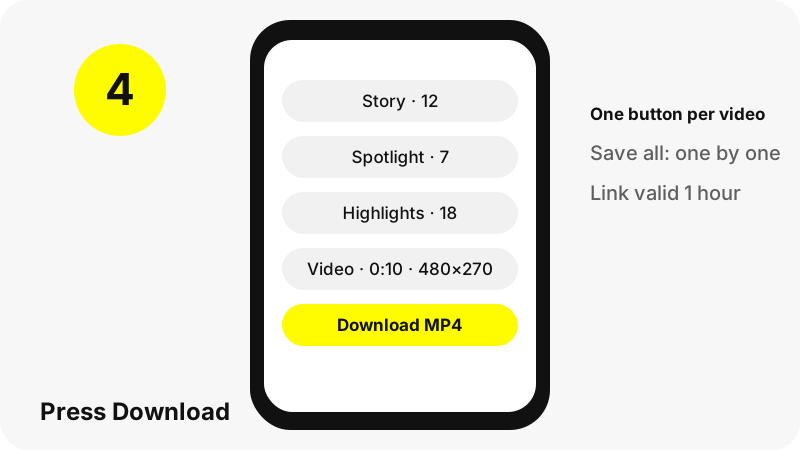
That is the whole Snapchat video download process. On a phone the browser may show a small confirmation bar before it saves the file. On a computer the MP4 usually lands straight in your Downloads folder.
What format and quality are the downloaded videos?
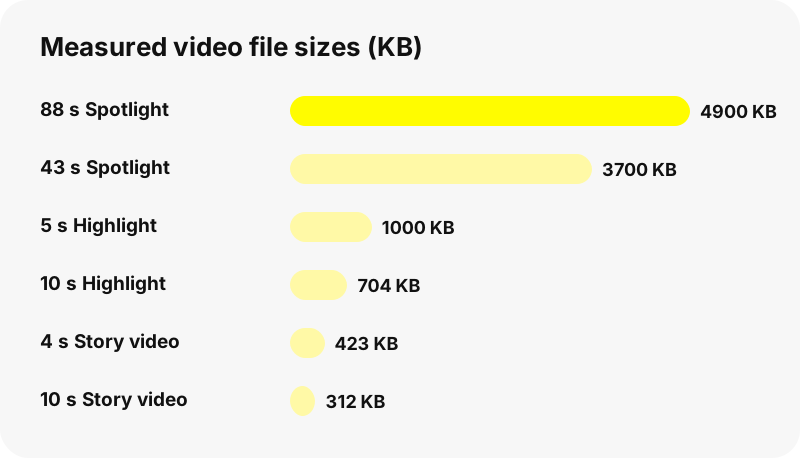
Every video is an MP4, the file Snapchat itself serves, saved byte for byte. We never re-encode, upscale or relabel a file as HD, so the quality is exactly what Snapchat stores. These are the files we measured with the tool on 2026-10-30:
| Video type | Size on screen | Length | File size |
|---|---|---|---|
| Story video (one profile) | 480×270 | 10 s | 312 KB |
| Story video (another profile) | 480×852 | 4 s | 423 KB |
| Highlight video | 720×1280 | 5 s | 1.0 MB |
| Highlight video | 479×852 | 10 s | 704 KB |
| Spotlight video | 540×960 | 43 s | 3.7 MB |
| Spotlight video | 540×960 | 88 s | 4.9 MB |
MP4 plays almost everywhere. Mozilla's reference for web developers puts it this way:
“The most commonly used containers for media on the web are probably MPEG-4 Part-14 (MP4) and Web Media File (WEBM).”
Why are Snapchat videos smaller than videos from your phone?
Because Snapchat compresses what it serves so it loads quickly on mobile data. A clip filmed in high resolution on a phone is stored by Snapchat as a lighter version, and that lighter version is the only one available on the public page.
So a Snapchat video download will never give you 1080p or 4K. Spotlight videos came out at 540×960 in every test, and Story videos ranged from 480×270 to 480×852. If a website promises a sharper copy, it is either upscaling the same file or making the claim up.
For a side-by-side of every file type, including photos and profile pictures, see Snapchat download formats.
What are the downloaded video files called?
Each file gets a readable name built from the username, the source and a date or number, so a folder full of downloads stays sorted. Your browser receives that name as a suggestion and may adjust characters your system does not allow.
| Source | File name pattern | Example |
|---|---|---|
| Story | user_story_YYYYMMDD-HHMMSS_n.mp4 | nba_story_20261029-181502_3.mp4 |
| Spotlight | user_spotlight_id.mp4 | nba_spotlight_[Spotlight id].mp4 |
| Highlight | user_highlight-title_n.mp4 | nba_Finals_2.mp4 |
The date in a Story file name is when the snap was posted, which helps when the same profile posts several times a day.
Can you download every video on a profile at once?
Yes, one by one. When a tab holds more than one snap, a button reading Save all with the count starts the downloads in order, with a short pause between files. Most browsers ask once whether the site may save several files; allow it and the rest follow.
There is no ZIP archive. Packing videos on a server would mean storing them, and we keep nothing. Saving the original MP4s one after another is slower to watch but gives you the untouched files.
The lists have limits so the page stays light on a phone: up to 150 Story snaps, 30 Highlights with 40 snaps each, and 60 Spotlight videos per profile.
Where do downloaded Snapchat videos go?
To your browser's normal download location. On a computer that is the Downloads folder unless you changed it. On iPhone, Safari saves into Files › Downloads. On Android, Chrome saves to the Download folder, and Google's help page adds:
“To find all the files that you've downloaded to your device, open the Files app.”
To move a video into your photo gallery, open it from Files and use Share › Save Video on iPhone, or move it to the DCIM or Movies folder on Android. Device-specific steps: iPhone, Android, PC and Mac.
Can you download a Snapchat video from a link?
Yes, for the link types we tested. A profile link such as snapchat.com/@name or snapchat.com/add/name opens the whole profile. A Spotlight link such as snapchat.com/spotlight/… shows that one video with its views, length and date, ready to save.
A Highlight link opens the profile with that Highlight already selected. Links copied from inside the app sometimes use other forms; if one does not work, paste the username instead, which always works for a public profile.
For Spotlight-only saving, the Snapchat Spotlight downloader opens on the Spotlight tab directly.
Why does a video not show up or fail to save?
- The account is personal. Snapchat shows only the name and Bitmoji of personal accounts, so there are no videos to list.
- The Story expired. Snaps that Snapchat removed are gone from our list too.
- The link is older than an hour. Download links expire after one hour. Search the username again for fresh links.
- Snapchat did not answer. Busy moments happen; wait a minute and retry.
- The owner opted out. Profiles that asked not to appear on SnapViewer are refused.
The guide why a Snapchat profile shows nothing walks through each case with fixes. A misspelled name is common too; the Snapchat username search checks whether a username has a public profile.
What can this Snapchat downloader not do?
Being clear about limits saves you time. SnapViewer reads the public profile page and nothing else, so many things other sites advertise are simply out of reach.
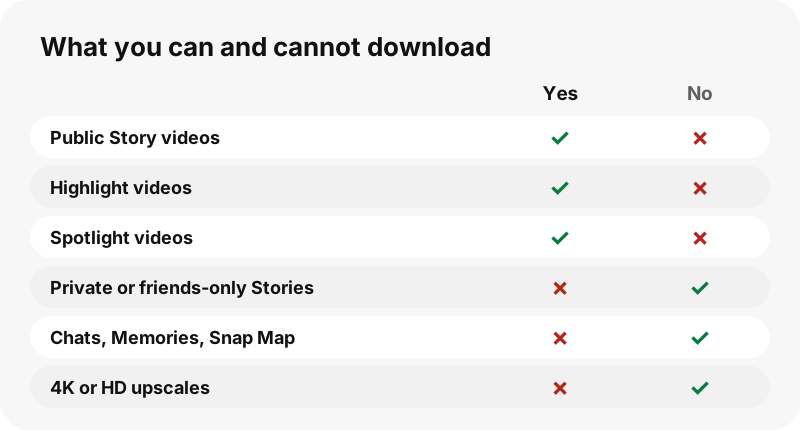
- No private accounts, friends-only Stories, chats or Memories.
- No location, Snap Map or friend lists. We never show them.
- No story history beyond what Snapchat still lists.
- No 1080p, 4K or MP3 versions, and no ZIP archive.
- No app, APK or extension: it is a web page.
Is it okay to download someone's Snapchat videos?
Watching a public video is what a public profile is for. Saving it is fine for personal viewing in most places, but the video still belongs to its creator. Reposting it, editing it into your own content or using it commercially needs the owner's permission.
Never use a downloader to keep tabs on a person. Account owners can ask us to stop showing their profile through our copyright and opt-out page, and we then refuse the username. For the legal side, read is it legal to download Snapchat videos.
Which other SnapViewer tools are useful?
Each tool reads the same public profile but opens on a different part of it:
- Snapchat Story downloader: the current Story, photos and videos in posting order.
- Snapchat Highlights viewer: saved Stories grouped by title.
- Snapchat profile viewer: the card with name, bio and subscriber count.
- Snapchat profile picture viewer: the picture in its stored size.
Frequently asked questions
Is this Snapchat video download tool free?
Yes. There is no sign-up, no payment and no watermark added by us. You only wait briefly if too many lookups arrive at the same moment.
Can I download Snapchat videos without the app?
Yes. SnapViewer runs in any browser on phone, tablet or computer. You never sign in to Snapchat and nothing is installed.
What format are the videos saved in?
MP4, exactly as Snapchat serves it. Story videos in our tests had AAC sound and Spotlight videos measured 540×960.
Can I download Snapchat videos in HD or 4K?
No. Snapchat stores compressed copies, and the public page only offers those. We save that file unchanged and never upscale or relabel it.
Can I download videos from a private Snapchat account?
No. Private accounts, friends-only Stories, chats and Memories are not public, so neither we nor any honest site can reach them.
Does the person know I downloaded their video?
SnapViewer never logs in, so your Snapchat account is not involved and we do not tell anyone. We cannot speak for what Snapchat logs on its own media servers.
Can I download a Spotlight video from its link?
Yes. Paste a snapchat.com/spotlight/ link and that single video appears with its views, length and date, ready to download.
How do I save all the videos on a profile?
Use the Save all button above the list. Files download one by one with a short pause; allow multiple downloads if your browser asks.
Is there a ZIP download?
No. Building a ZIP would require storing the videos on a server, and we store nothing. You get the original MP4 files one at a time.
Why did my download link stop working?
Each link is signed and expires after one hour. Look up the username again to get fresh links.
Where are the videos saved on iPhone?
Safari puts them in the Files app under Downloads. Open a video there and tap Share, then Save Video, to move it to Photos.
Can I download Snapchat videos with sound?
Yes, when the original has sound. The MP4 includes the audio track Snapchat stored with the video; we do not remove or add anything.
Is SnapViewer part of Snapchat?
No. SnapViewer is an independent tool and is not affiliated with, endorsed by, or connected to Snap Inc. It only reads public profiles.
How can I stop my videos from appearing here?
Write to us through the copyright and opt-out page with your username and a way to confirm it is yours. After that, the tool refuses your profile and old links stop working.
Guides
Story viewer — Type a username to watch a public profile's Stories, Spotlight and Highlights.
Sources
- What is a Public Profile on Snapchat? — Snapchat Support
- Privacy by Product: Stories — Snap Inc.
- How do I post Snaps to Spotlight? — Snapchat Support
- Media container formats (file types) — MDN Web Docs
- MP4 file format — Wikipedia
- <a>: The Anchor element (download attribute) — MDN Web Docs
- Download a file (Chrome on Android) — Google
- Where to find downloads on your iPhone or iPad — Apple