What is a public Snapchat Story?
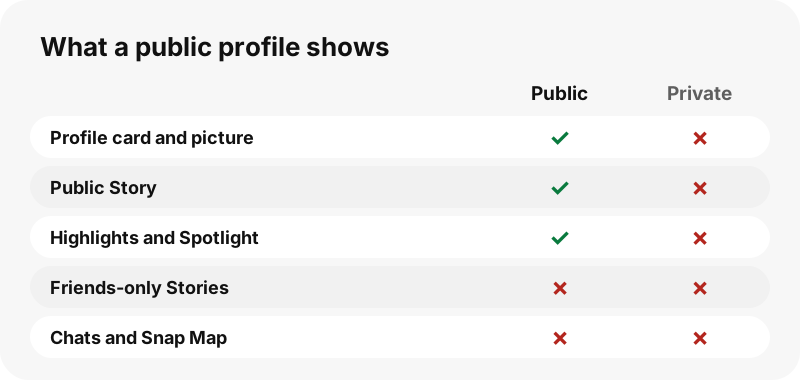
A Story is a run of snaps that plays in order. On a public profile, the Story is open to everyone, not only friends; Snap describes a My Story set to Everyone as public and visible to anyone. Snap says most Stories are deleted after 24 hours unless they are saved to the public profile, which is why the Story tab changes from day to day. In our test one creator had 112 snaps in the Story at once, posted over about six days.
Which browser works on PC?
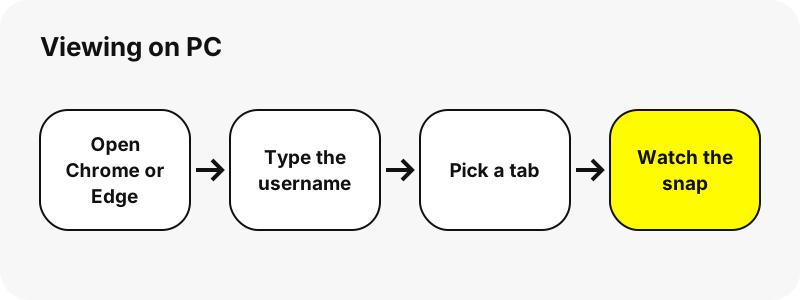
Chrome or Edge works; any up-to-date browser that plays MP4 video does. SnapViewer is a web page, so there is no PC app to install and nothing asks for your Snapchat login.
What can you see?
Each snap of the public Story, newest last, with its date and whether it is a photo or a video. Videos play in the page with sound; photos open in full.
Tips for Stories on PC
- Snaps are listed oldest first, the way Snapchat plays them.
- Photos and videos are mixed; the label under each preview says which.
- A Story can be long: the page lists up to 150 snaps and says so if there are more.
- Come back the next day; old snaps drop off as new ones are posted.
What can you never see?
These stay private on Snapchat, and no website can show them without the owner's account:
- Private accounts and friends-only Stories
- Chats, Snaps sent to friends and Memories
- Location (Snap Map) and friend lists
- Who else viewed a Story
How much data does it use?
In our tests a 10-second Story video was 320 KB and a Story photo 178 KB, so watching 20 snaps uses roughly a few megabytes.
Can you save what you watch on PC?
Yes, each snap has a Download button. The file lands in the Downloads folder. The full steps for saving are on Download Snapchat Stories on PC.
| Question | Answer on PC |
|---|---|
| Browser | Chrome or Edge |
| Where the file lands | Chrome on Windows saves to \Users\<username>\Downloads by default, and Edge shows its folder (for example C:\Users\[your name]\Downloads) under Settings › Downloads › Location. |
| Opens with | The Microsoft Photos app (it supports MP4) |
How do you find a saved snap on PC?
In Chrome, the download icon next to the address bar shows progress and the finished file; More › Downloads lists every download.
Move the file from Downloads to Pictures, Videos or Music in File Explorer if you want to keep it with your other media.
| Question | Answer on PC |
|---|---|
| How to see it | In Chrome, the download icon next to the address bar shows progress and the finished file; More › Downloads lists every download. |
| Change the folder | Chrome: Settings › Downloads › Change. Edge: Settings › Downloads › Location › Change. |
How does the viewer look on PC?
On a Windows PC the snaps fill five or six columns and, on screens 1,100 px and wider, the contents list stays fixed beside the guide. Videos have the usual player controls (play, volume, full screen). The save-all button downloads one file at a time with a short pause, and your browser may ask once whether the site can download several files.
Does the account owner see you?
SnapViewer reads the public page from our server without logging in, so your Snapchat account is never used and your name is not shown to anyone. The previews themselves load from Snapchat's servers, which see a normal web request, as for any public page.
What if nothing shows up on PC?
- The profile may have no public Story today; Highlights and Spotlight can still be there.
- Snaps older than a few days have usually been removed by Snapchat.
- Refresh the page and try again; Snapchat sometimes does not answer at once.
- Make sure Chrome or Edge is up to date so MP4 playback works.
Every browser keeps its own download folder setting; check the one you used.
What else can you save on PC?
Which other devices are covered?
Other tools
Frequently asked questions
Can I view Snapchat Stories on PC without an account?
Yes, if the profile is public. Open the page in Chrome or Edge, type the username and the public content appears. Private accounts cannot be viewed.
Do I need the Snapchat app on PC?
No. Everything runs in Chrome or Edge. You only need the app to post or to see friends' private Stories.
Will the person know I looked?
SnapViewer never logs in, so your account is not used. We cannot see what Snapchat itself records about requests to its servers.
Can I view a private account on PC?
No. No website can do that honestly; pages that promise it are a red flag.
Is SnapViewer part of Snapchat?
No. It is an independent tool and is not affiliated with Snap Inc.
Can I download what I watch?
Yes. Each snap has a Download button; the file lands in the Downloads folder.
How long can I see a Story?
Until Snapchat removes it. Snap says most Stories delete after 24 hours unless saved to the public profile; in our tests a public profile listed snaps up to about six days old.
Are the snaps in order?
Yes. They are listed in the order Snapchat plays them, with the date of each snap.
Guides
Story viewer — Type a username to watch a public profile's Stories, Spotlight and Highlights.