What is Snapchat Spotlight?
Spotlight is Snapchat's public feed of short vertical videos, similar to other short-video feeds. A Spotlight snap belongs to its creator's profile and shows a view count. In our tests Spotlight videos were 540×960 MP4 files from 6 to 88 seconds long, and one creator profile listed 23 of them. Each has its own snapchat.com/spotlight/ link.
Which browser works on Mac?
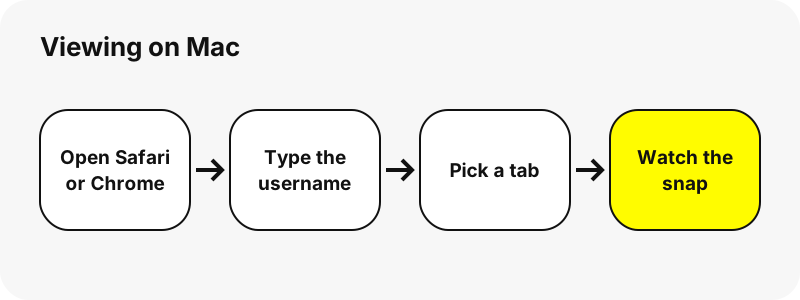
Safari or Chrome works; any up-to-date browser that plays MP4 video does. SnapViewer is a web page, so there is no Mac app to install and nothing asks for your Snapchat login.
What can you see?
The profile's recent Spotlight videos with view count, length and upload date. Paste a single Spotlight link to open just that video.
Tips for Spotlight on Mac
- Each Spotlight card shows the length, the view count and the upload date.
- Paste a snapchat.com/spotlight/ link to open one video alone.
- Spotlight videos are the longest snaps, so they use the most data.
- The creator's caption appears under the video when there is one.
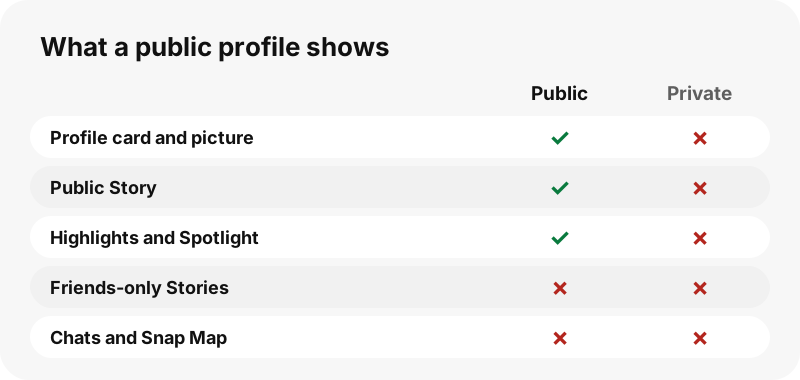
What can you never see?
These stay private on Snapchat, and no website can show them without the owner's account:
- Private accounts and friends-only Stories
- Chats, Snaps sent to friends and Memories
- Location (Snap Map) and friend lists
- Who else viewed a Story
How much data does it use?
Spotlight videos are the heaviest: a 43-second one was 3.8 MB in our tests. On mobile data, prefer Wi-Fi for long sessions.
Can you save what you watch on Mac?
Yes, each snap has a Download button. The file lands in the Downloads folder. The full steps for saving are on Download Snapchat Spotlight on Mac.
| Question | Answer on Mac |
|---|---|
| Browser | Safari or Chrome |
| Where the file lands | Chrome on Mac saves to /Users/<username>/Downloads by default; Safari saves to the folder set in Safari › Settings › General › File download location. |
| Opens with | QuickTime Player |
How do you find a saved snap on Mac?
Click Safari's downloads button near the top-right of the window; in Chrome, use the download icon next to the address bar.
Drag the file from Downloads to the folder you want in Finder; select it and press Space to preview it with Quick Look.
| Question | Answer on Mac |
|---|---|
| How to see it | Click Safari's downloads button near the top-right of the window; in Chrome, use the download icon next to the address bar. |
| Change the folder | Safari › Settings › General › File download location. Chrome: Settings › Downloads › Change. |
How does the viewer look on Mac?
On a Mac the page uses the wide layout: five or six columns of snaps and a fixed contents list on screens 1,100 px and wider. Safari and Chrome both play the MP4 files in the page. When saving several snaps in a row, Safari's downloads button near the top of the window shows each finished file.
Does the account owner see you?
SnapViewer reads the public page from our server without logging in, so your Snapchat account is never used and your name is not shown to anyone. The previews themselves load from Snapchat's servers, which see a normal web request, as for any public page.
What if nothing shows up on Mac?
- A Spotlight snap can be removed by its creator or by Snapchat; the link then finds nothing.
- Some Spotlight snaps are marked restricted by Snapchat and cannot be shown.
- Refresh the page and try again; Snapchat sometimes does not answer at once.
- Make sure Safari or Chrome is up to date so MP4 playback works.
Preview does not play animated GIFs; use Quick Look or a browser.
What else can you save on Mac?
Which other devices are covered?
Other tools
Frequently asked questions
Can I view Snapchat Spotlight on Mac without an account?
Yes, if the profile is public. Open the page in Safari or Chrome, type the username and the public content appears. Private accounts cannot be viewed.
Do I need the Snapchat app on Mac?
No. Everything runs in Safari or Chrome. You only need the app to post or to see friends' private Stories.
Will the person know I looked?
SnapViewer never logs in, so your account is not used. We cannot see what Snapchat itself records about requests to its servers.
Can I view a private account on Mac?
No. No website can do that honestly; pages that promise it are a red flag.
Is SnapViewer part of Snapchat?
No. It is an independent tool and is not affiliated with Snap Inc.
Can I download what I watch?
Yes. Each snap has a Download button; the file lands in the Downloads folder.
Can I open one Spotlight video from a link?
Yes. Paste a snapchat.com/spotlight/ link instead of a username and the tool shows that video alone.
Does Spotlight show the view count?
Yes. Each Spotlight card shows the views Snapchat reports, with the length and the upload date.
Guides
Spotlight — Save public Spotlight videos as MP4, with views and length shown.